Settings
26 Chapter 2: Operation 98-135323-H
Inland Waterways
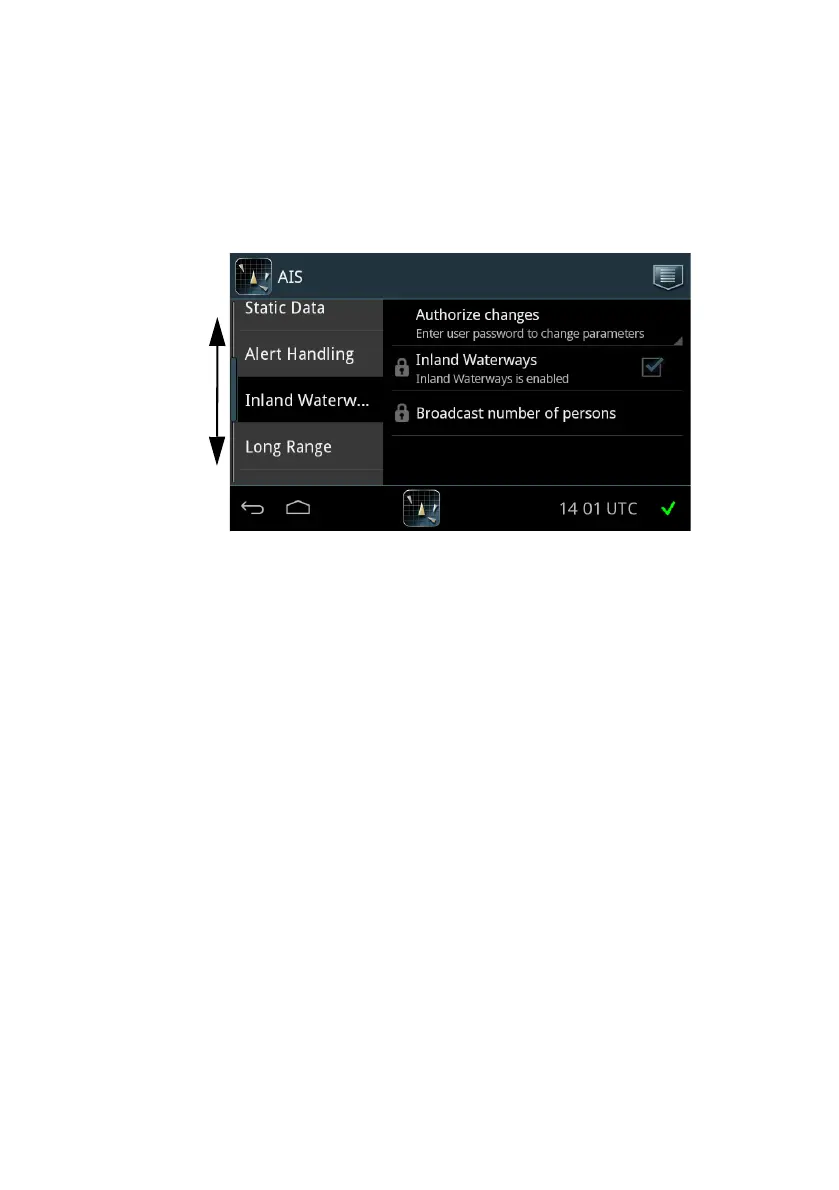
On this page you enable the settings for Inland Waterways shown in Voyage
and Static Data, and you can broadcast the number of persons on board, if
requested to do so.
To enable Inland Waterways do as follows:
1. Unlock the page by tapping Authorize changes and entering the user-level
password.
2. Tap Inland Waterways to enable it.
When enabled, further fields will be available in Voyage and Static Data.
To broadcast the number of persons on board (this is the total number of
persons: crew members, shipboard personnel and passengers) do as follows:
1. Unlock the page by apping Authorize changes and entering the user-level
password.
2. Tap Broadcast number of persons.
3. At Broadcast persons onboard tap Send.
Figure 20: Settings – Inland Waterways




 To Next Page