To work with messages
34 Chapter 2: Operation 98-135323-H
To work with messages
Overview
You can send, broadcast and receive text messages and safety-related messages
(SRM) to and from all ships within VHF range. An unread message is shown as a
closed envelope in the bottom bar of the screen. White envelopes mean that
new messages have arrived since you last tapped the area for messages in the
bottom bar. Gray envelopes mean that no new messages have arrived since you
last tapped the area for messages.
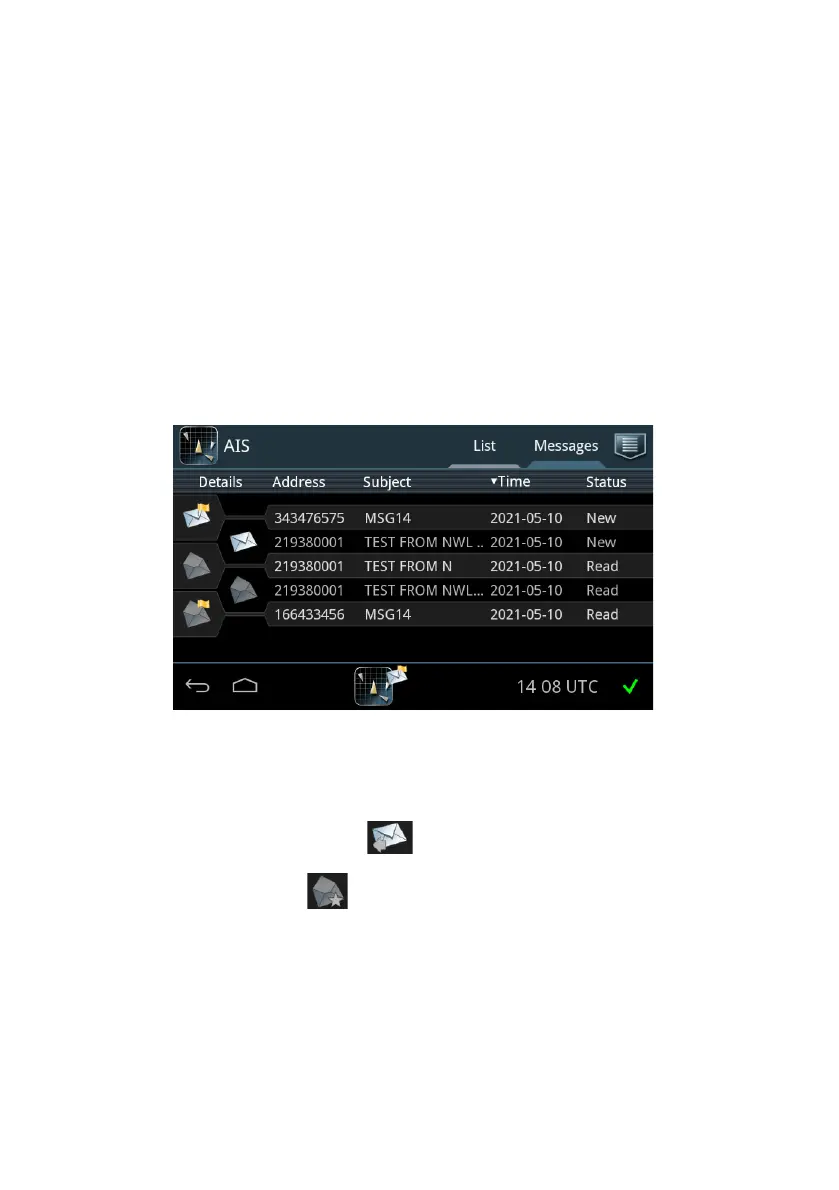
To view all messages tap the tab Messages in the idle screen.
Each row represents an AIS message.
• Closed envelope: The message has not been read and is newer than 24 hours.
• Closed envelope with arrow : Sent message.
• Open envelope: The message has been read or is older than 24 hours.
• Envelope with a star : The message is stored (tagged), see Store
messages on page 39.
• Yellow flag: Broadcast safety-related message.
• Red flag: Individual safety-related message.
The latest 20 individual safety-related messages and broadcast safety-related
messages are stored (minimum). There can also be stored up to 20 messages by
the user tagging a message - see below.
Broadcast safety-related messages (e.g.
Figure 27: Overview of Messages screen














 To Next Page