Alerts and notifications
98-135323-H Chapter 2: Operation 45
Alert history
The alert history contains alerts of the last 24 hours (or maximum1000 entries).
The alert history is cleared when you switch off the SAILOR 6004 Control Panel.
The alerts are not saved. To display the alert history do as follows:
1. Tap the Alert icon in the lower right corner.
2. Tap History to display a list of alerts. You can swipe through the list.
3. Tap an alert to display specific alert information.
Alert acknowledgment
Active alarms and warnings must be acknowledged. When all active alarms and
warnings are acknowledged the icons stop flashing. To acknowledge an alert do
as follows:
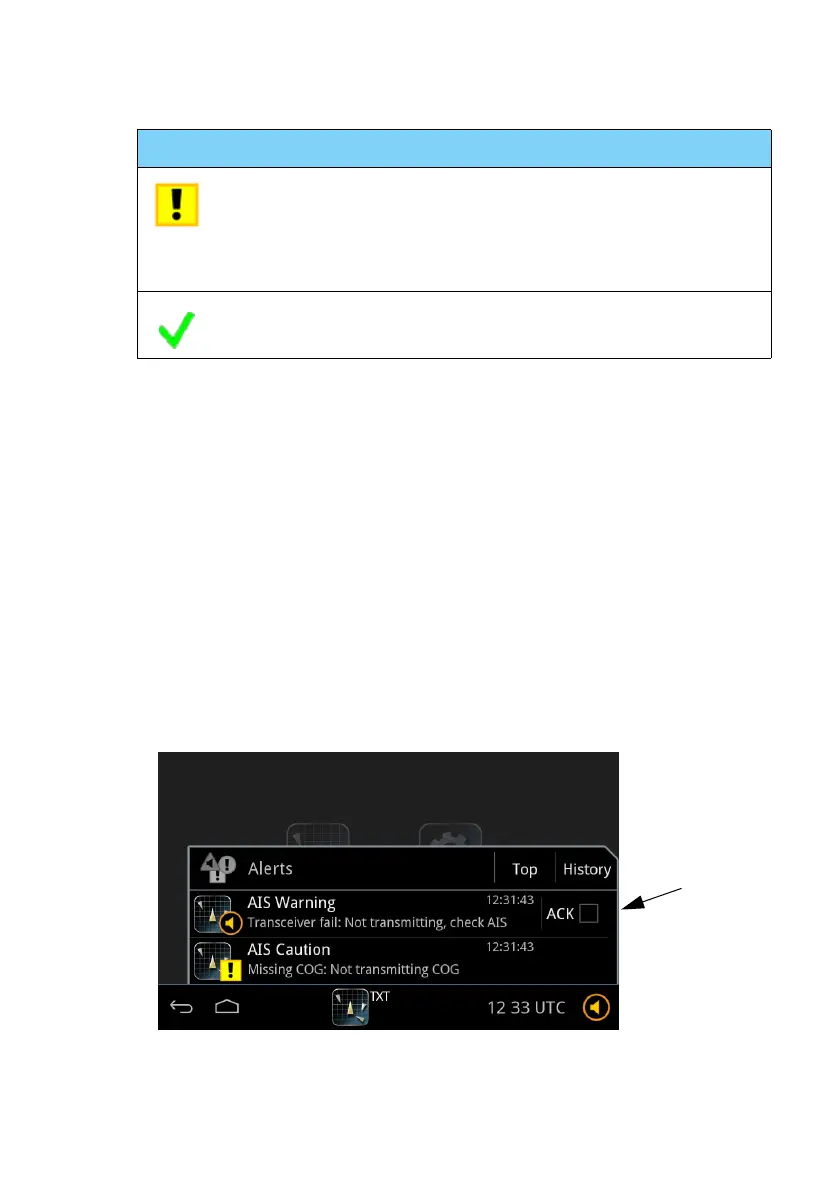
1. Tap the alert icon in the lower right corner to display the list with alerts.
Caution:Alert A yellow square with an exclamation mark in
the middle of the square.
A caution alert disappears automatically when
the caution situation is cleared.
(check mark) No active alerts
Icon Name Icon description
Figure 40: Alert list with ACK check box





 To Next Page