Phantom_1024_V2.023_en.PDF http://www.codelight.com
10
2.4. Setting up the Fixture Channels
By setting up the swap of Pan and Tilt, you can control fixtures, which is installed against the stage, to swap
Pan/Tilt axis, Invert Pan and/or Tilt, so that the mirror movement makes the control more direct and easier.
Dimming channel can be inverted too.
Note: The setup should be done before you program the show. Otherwise, errors of moving direction will occur in
running the program.
The dimming channel of the same fixtures will be inverted if you invert the dimming value.
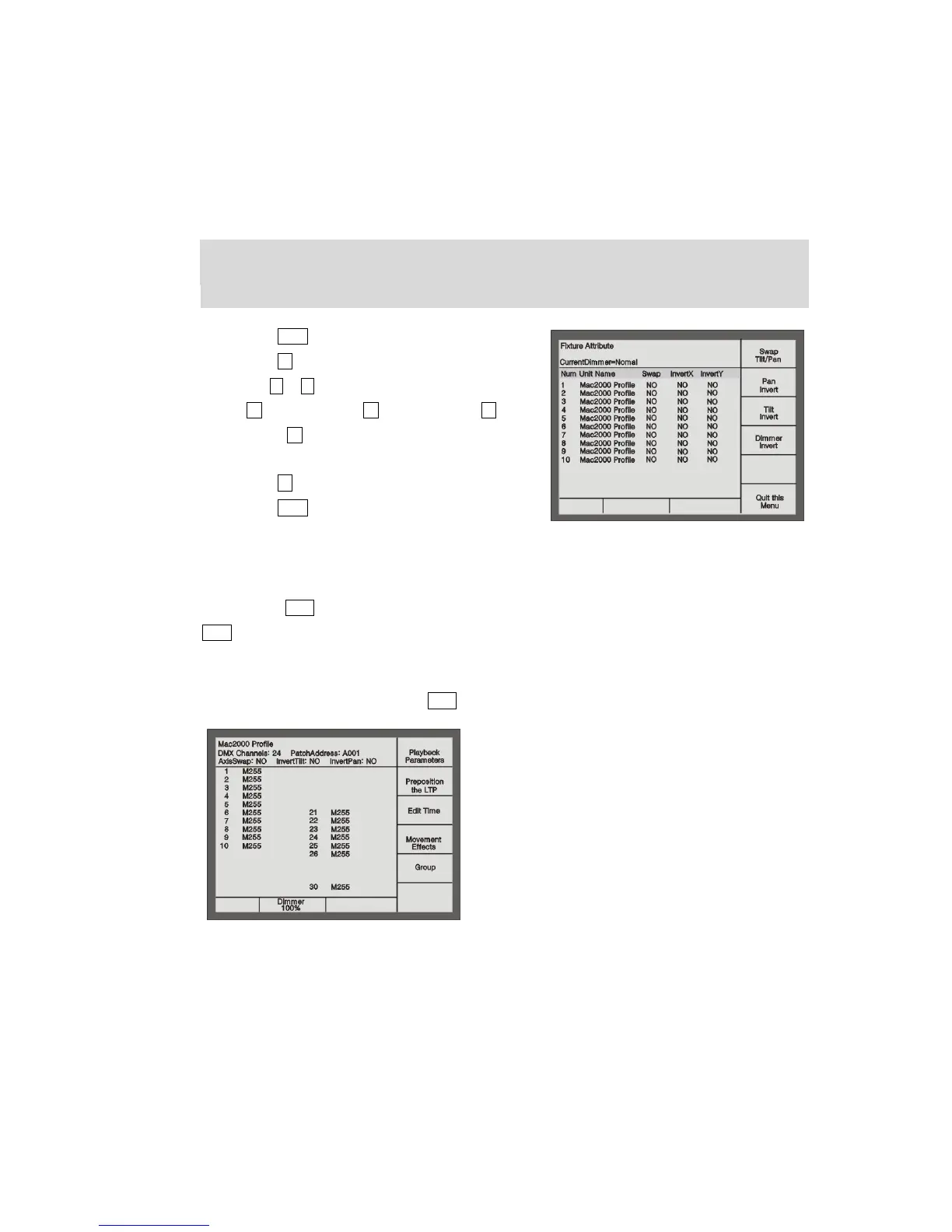
Press Patch to enter “Setup Patch” menu;
Press S5 [Fixture Alignment];
Use or button to select the fixture you needed;
S1 for swap Tilt/Pan, S2 for Pan Invert and S3 for Tilt
Invert, S4 to invert the dimming channel of current
type of fixture;
Press S6 [Quit this Menu];
Press Patch to exit patching.
2.5. View the Patching
Use the button View in the Numeric keypad to view the Patch of Unit, Preset and Playback. By pressing button
View and holding still, then press Unit button, you can view the DMX address and the special setup of Pan/Tilt
channel.
The LCD screen when pressing the button View + Unit button 1 shown as follows:


 To Next Page