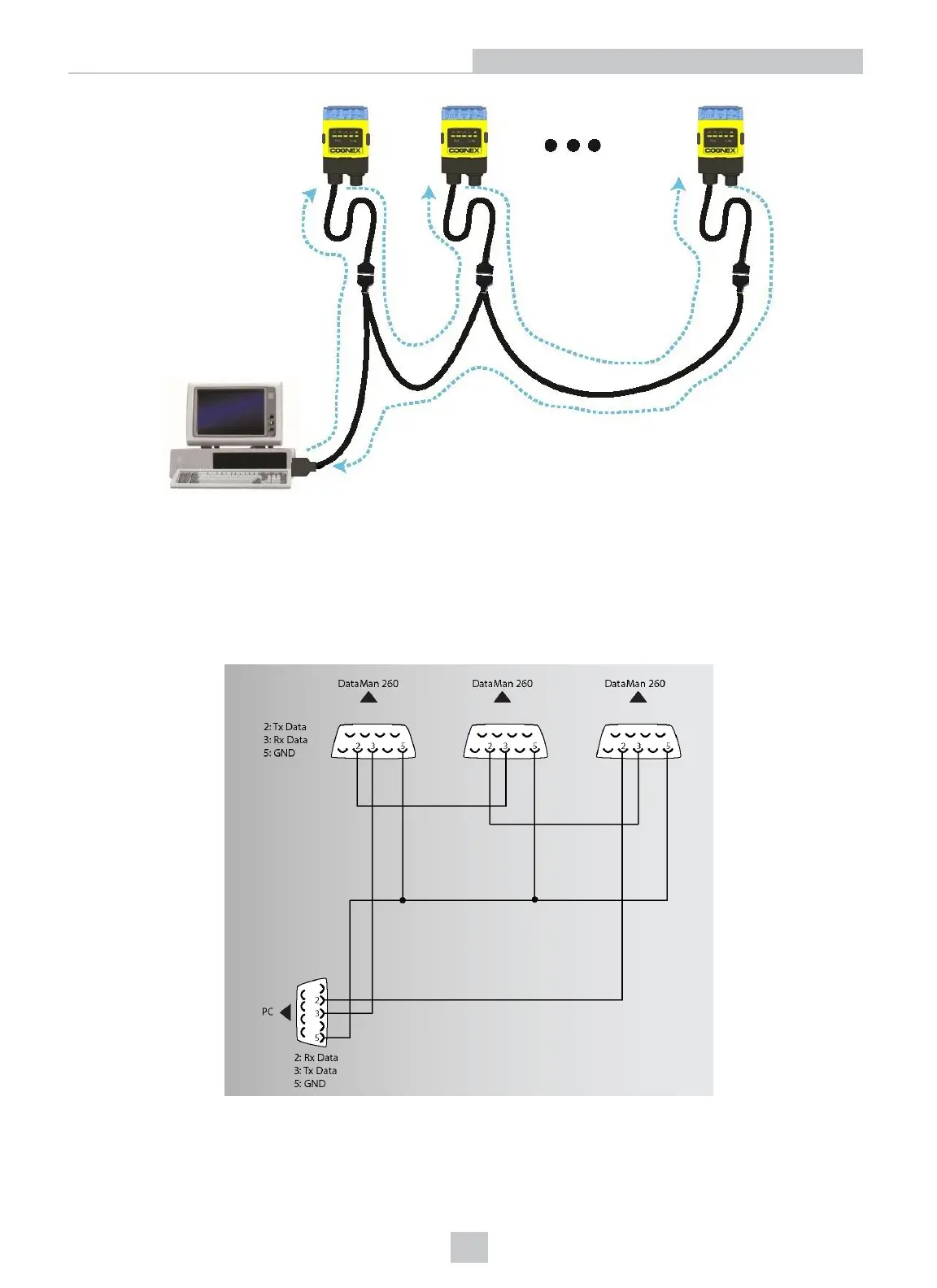
You must construct your own cable that meets the requirements of your system configuration.
The cable must provide a DB-15 connector for each DataMan 260 and a DB-9 connector for the PC serial port. Each DB-
15 connector must provide Tx Data, Rx Data, Trigger (Input 0), ground, and DC power. The Tx Data and Rx Data pins on
adjacent connectors must be connected to provide the multi-port connection.
The following diagram shows how to create a multi-port cable for a 3-reader system. In the example, all the readers
share a common trigger. It is also possible to wire individual triggers for each reader.
You must connect each DataMan 260 to DataMan Setup Tool using a USB connection and set the DataMan for multi-
port operation. To configure a DataMan 260 for multi-port operation, click on the Enable Multi-Port (RS-232 Sharing)
check box in Communication Settings.
39
Setting Up Your DataMan 260









 To Next Page