6
User Manual
2.2 Unpacking and checking the components
Take the package to the chosen installation site, handling it with care to avoid knocking or vibrating
the package. Follow the normal precautions regarding manual lifting of a load.
Open the package and carefully remove the unit and its accessories to avoid damage.
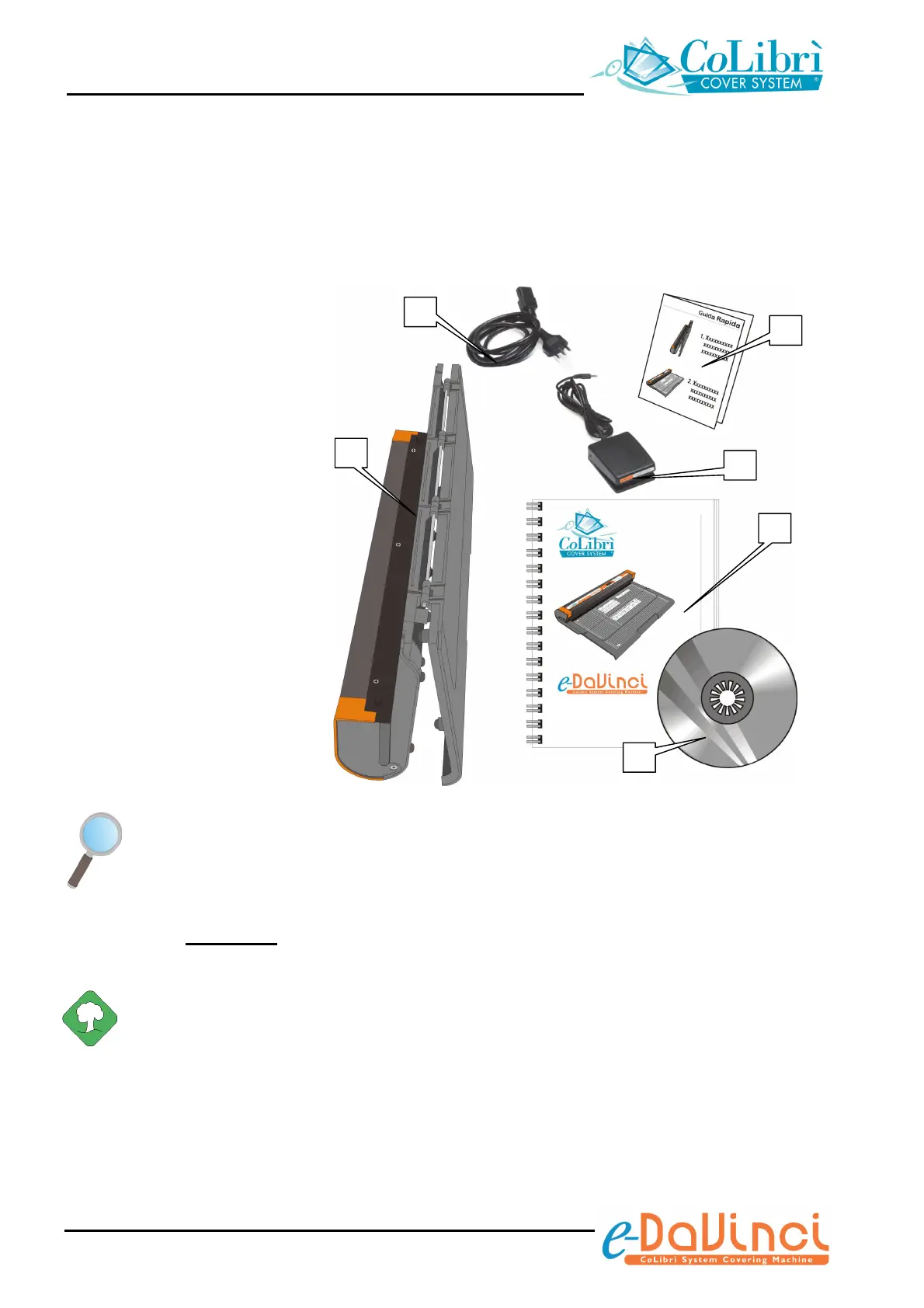
Check that the following items are in the package:
1) N° 1 Machine body with the work
surface folded to save space
2) N° 1 Power cable *
3) N° 1 Copy of this manual *
4) N° 1 Quick Reference Guide *
5) N° 1 CD-ROM containing demo
clips that show one how to use
the unit *
6) N° 1 cycle start pedal with
power supply cable *
*) Accessory items placed inside
protective bags
Confirm that the package contains all the items listed above and check that the main unit
and its accessories have not been damaged during transportation. Immediately inform the
manufacturer in the event of damage, defects or differences being found.
Keep all the packaging materials. If it becomes necessary to ship or transfer the unit,
re-use exclusively
the original packaging, in order to avoid damages to the equipment
during the transport.
In any event, carefully dispose of the plastic or non-biodegradable materials.
2
1
4
3
5
6
User Manual


 To Next Page