DX-80 INSTALLATION AND MAINTENANCE MANUAL
P7290 IMM 3-178
2. Press [msg].
MESSAGE TYPE
call me preprog
3. Press [preprog]. You are prompted to select the appropriate message:
EMPTY
send next chg
4. Select the text message to send:
To select from the preprogrammed list of text messages to send press [next] until the appropriate message
displays.
Or...
Press [chg] to input a custom message.
_
bksp save chg
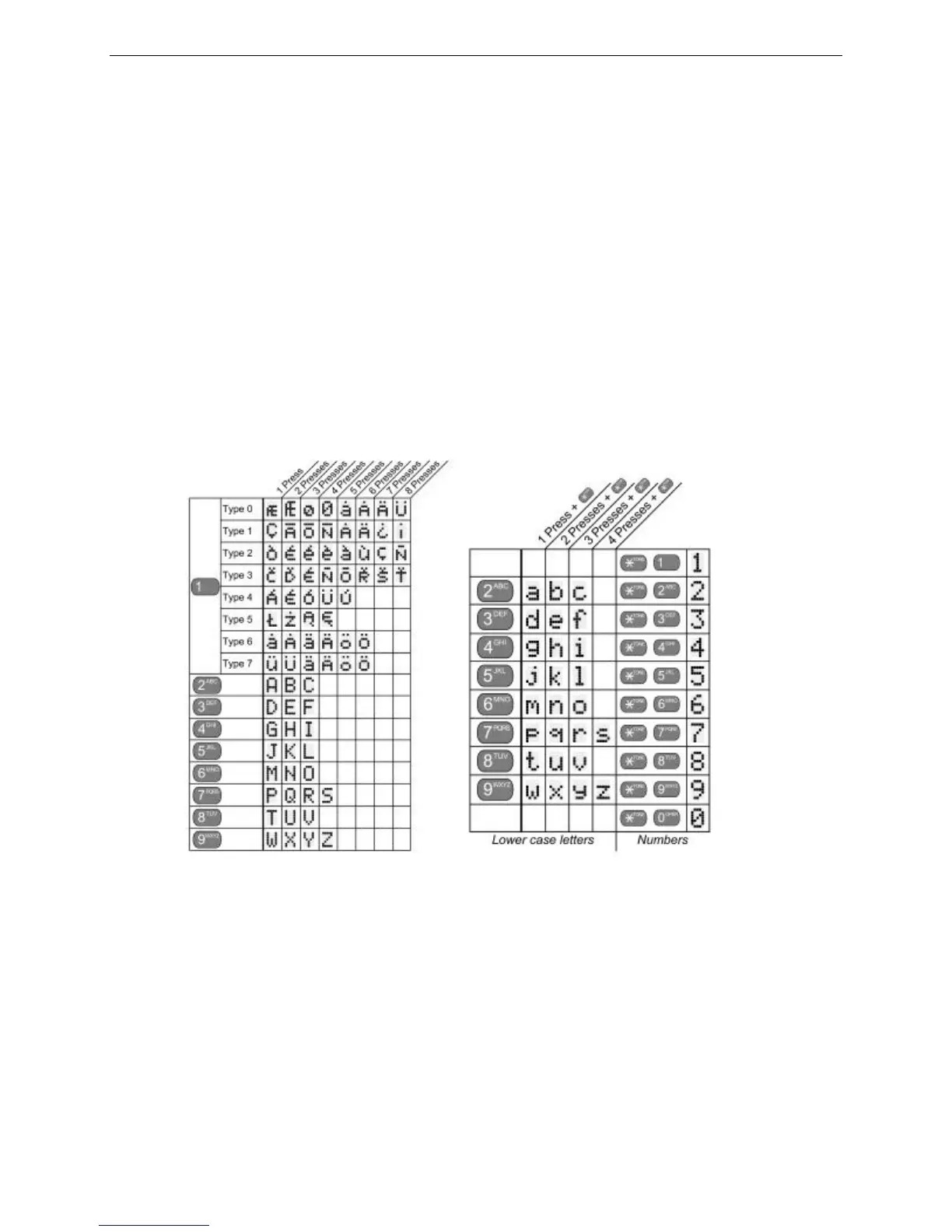
Use the table and dial pad keys to input the message. Then press [save].
5. Press [send ] to send the message to the called extension.
Operation – Sending a “Voice” Message (Voice Mail System Required)
1. Place a call to an extension, you get no answer or busy…
CALLING STA xxx
cbck msg
STA xxx BUSY
cbck msg next
2. Press [msg]. When the (optional) DX-80 Voice Mail system is equipped, the options in the display change to
add this option.
MESSAGE TYPE
callme vmsg prep
Number + * = lower case letter














 To Next Page