Atena Easy Addressable Fire Alarm Panel – Installation and Programming Manual
42
7.5.1 Sounders Outputs
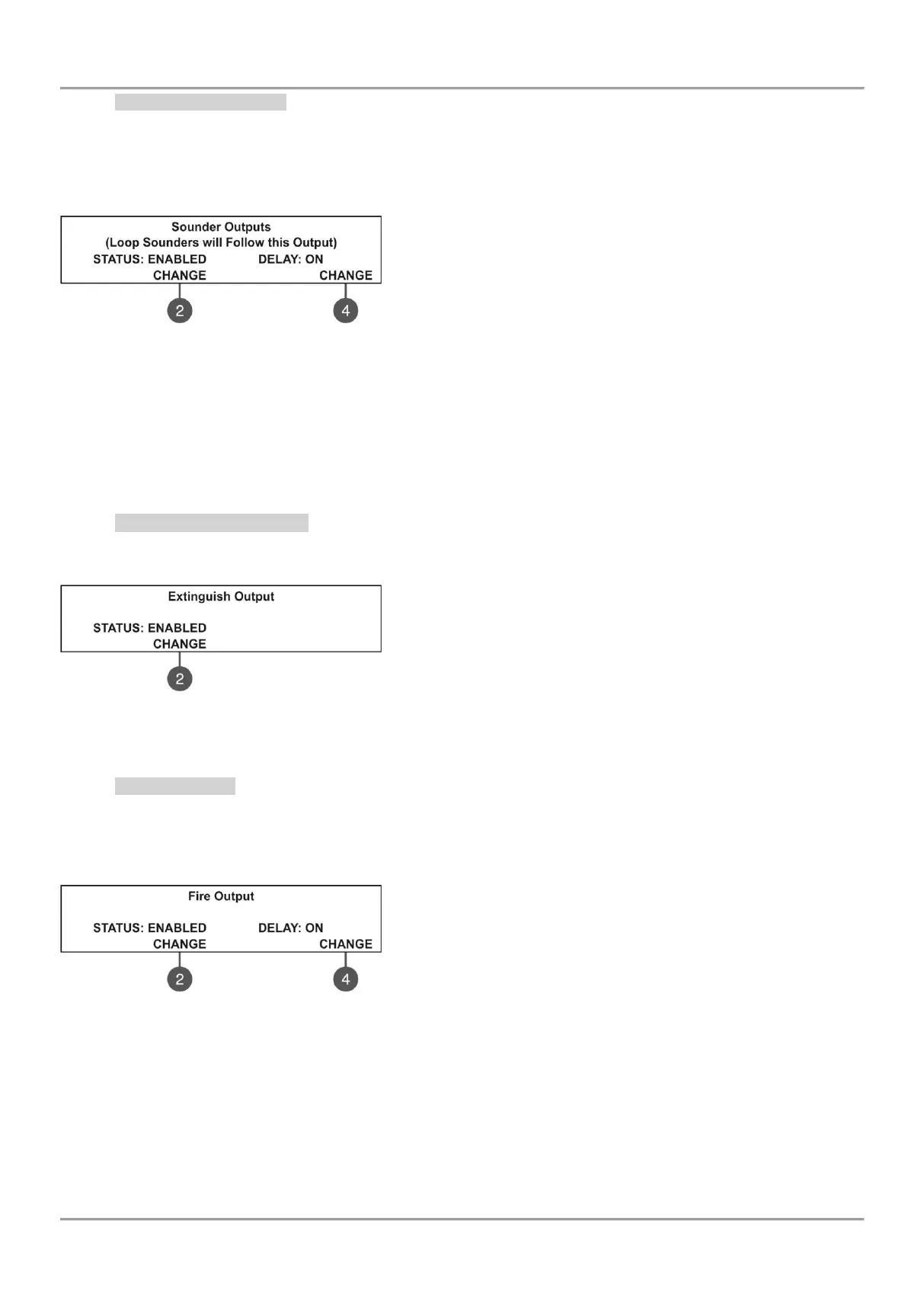
In this submenu the installer can disable/ enable the sounders activation and the time delay operation.
To access the SOUNDER submenu, enter in the installer’s menu - 5. PANEL OUTPUTS - SOUNDER (1).
Attention: In access level 2 you can only review the set delay status (ON, OFF, SCHEDULE), with no rights to
change it!
The functional buttons have the following action:
(2) - Press to change the status of the sounder outputs. Every
pressing of the button changes alternatively the ENABLED -
DISABLED status. When the sounder outputs are disabled the LEDs
‘Sounder Output Fault/ Disable’ and ‘Disable’ light on permanently.
(4) - Press to set the time delay operation. Every pressing of the
button changes the ‘Delay’ setting:
• ON - The delay of sounder outputs will be active when DAY operation mode is set - see the description for
menu 6.3 DAY/ NIGHT operation modes.
• OFF - No delay of sounder outputs activation. The sounder outputs are activated immediately.
• SCHEDULE - The delay of sounder outputs will be active on schedule - see the description for menu 6.3
DAY/ NIGHT operation modes.
All set parameters are confirmed with ENTER button.
7.5.2 Extinguishing Output
In this submenu the installer can disable/ enable the extinguish output activation. To access the EXTINGUISH
submenu, enter in the installer’s menu - 5. PANEL OUTPUTS – EXITING. (2).
The functional button has the following action:
(2) - Press to change the status of the extinguish output. Every
pressing of the button changes alternatively the ENABLED -
DISABLED status. When the extinguish output is disabled the LED
‘‘Disable’ light on permanently.
All set parameters are confirmed with ENTER button.
7.5.3 Fire Output
In this submenu the installer can disable/ enable the fire output activation and the time delay operation.
To access the FIRE submenu, enter in the installer’s menu - 5. PANEL OUTPUTS - FIRE (3).
Attention: In access level 2 you can only review the set delay status (ON/ OFF), with no rights to change it!
The functional buttons have the following action:
(2) - Press to change the status of the fire output. Every pressing of
the button changes alternatively the ENABLED - DISABLED status.
When the fire output is disabled the LEDs ‘Fire Output Fault/ Disable’
and ‘Disable’ light on permanently.
(4) - Press to set the time delay operation. Every pressing of the
button changes the ‘Delay’ setting:
• ON - The delay of fire output will be active when DAY operation mode is set - see the description for menu
6.3 DAY/ NIGHT operation modes.
• OFF - No delay of fire output activation. The fire output is activated immediately.
• SCHEDULE - The delay of fire output will be active on schedule - see the description for menu 6.3 DAY/
NIGHT operation modes.
All set parameters are confirmed with ENTER button.



 To Next Page