Atena Easy Addressable Fire Alarm Panel – Installation and Programming Manual
44
7.6.1 Access Codes
Attention: The access codes can be changed only from access level 3!
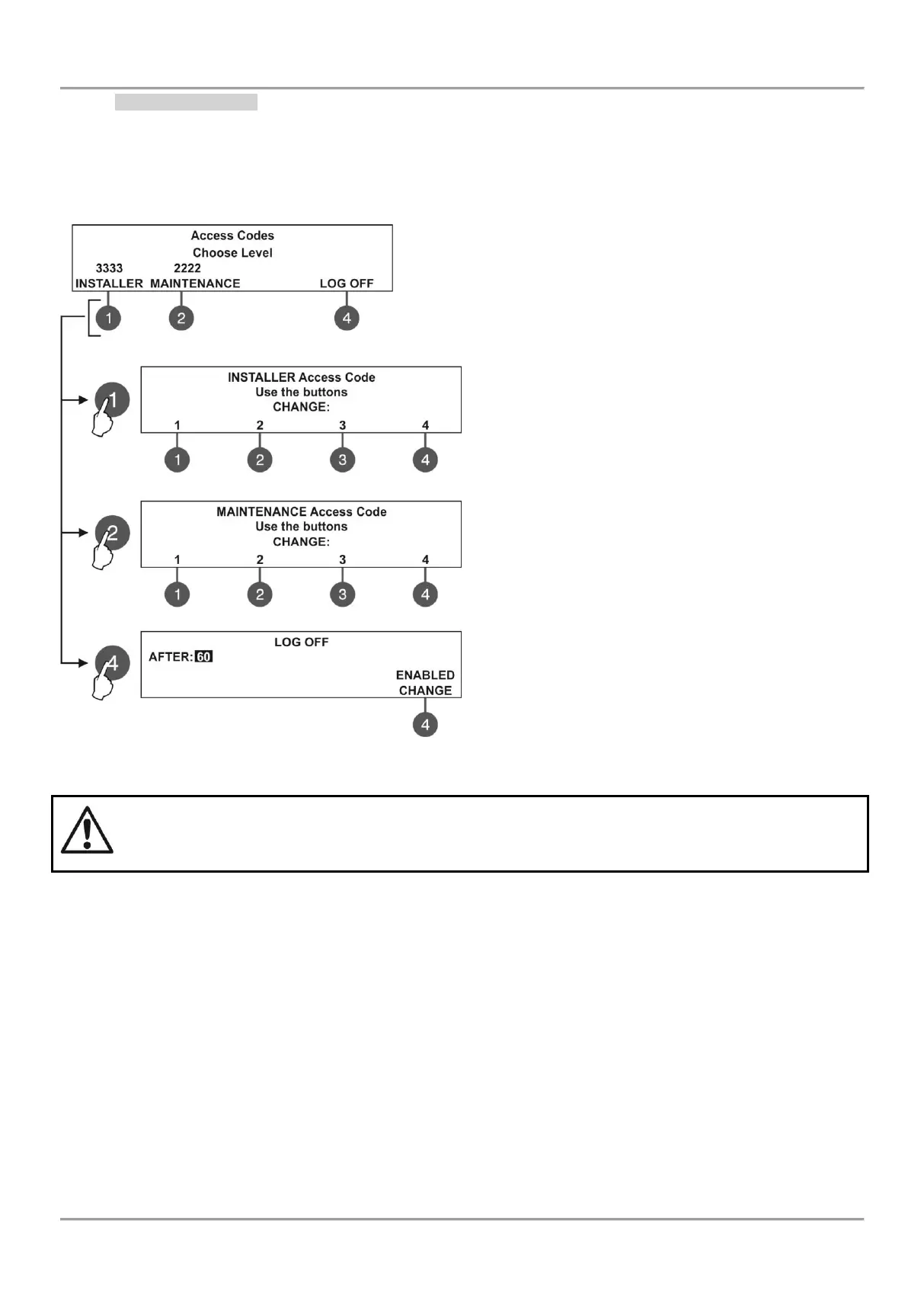
In this submenu the installer can change the code combinations for access to INSTALLER and MAINTENANCE levels.
To access the ACCESS CODES submenu, enter in the installer’s menu - 6. GENERAL SETTING - 6.1) ACCESS
CODES.
The screen displays the supported submenus and the current set access code for the INSTALLER and
MAINTENANCE programming menus:
The settings are analogical for both levels.
Use the functional buttons to set access code for:
(1) - Press to change INSTALLER CODE
(2) - Press to change MAINTENANCE CODE
(3) - Press to enter a submenu for setting time for
automatic exit from the INSTALLER and MAINTENANCE
menus.
Use the functional buttons to enter new 4-digit
INSTALLER code combination. The system will ask to
confirm the change. The exit is automatic to Access
Level main screen.
The default INSTALLER code is 3333.
Use the functional buttons to enter new 4-digit
MAINTENANCE code combination. The system will ask
to confirm the change. The exit is automatic to Access
Level main screen.
The default MAINTENANCE code is 2222.
In field „AFTER“ enter time from 0 up to 60 minutes for
automatic exit from the INSTALLER and MAINTENANCE
programming menus.
Use button (4) CHANGE to set the status:
- ENABLED – The automatic exit is enabled.
- DISABLED – The automatic exit is disabled.
If the installer’s access code is changed and obscured you have to perform a hardware reset of the
panel settings!



 To Next Page