24
2
1
ON
1 2 3 4 6 75 8
1
5
OFF
ON
1 2 3 4 6 75 8
4
S1 S2
3
2
OFF ON
AUTO (default)
ON
1 2 3 4 6 75 8
ON
1 2 3 4 6 75 8
ON
1 2 3 4 6 75 8
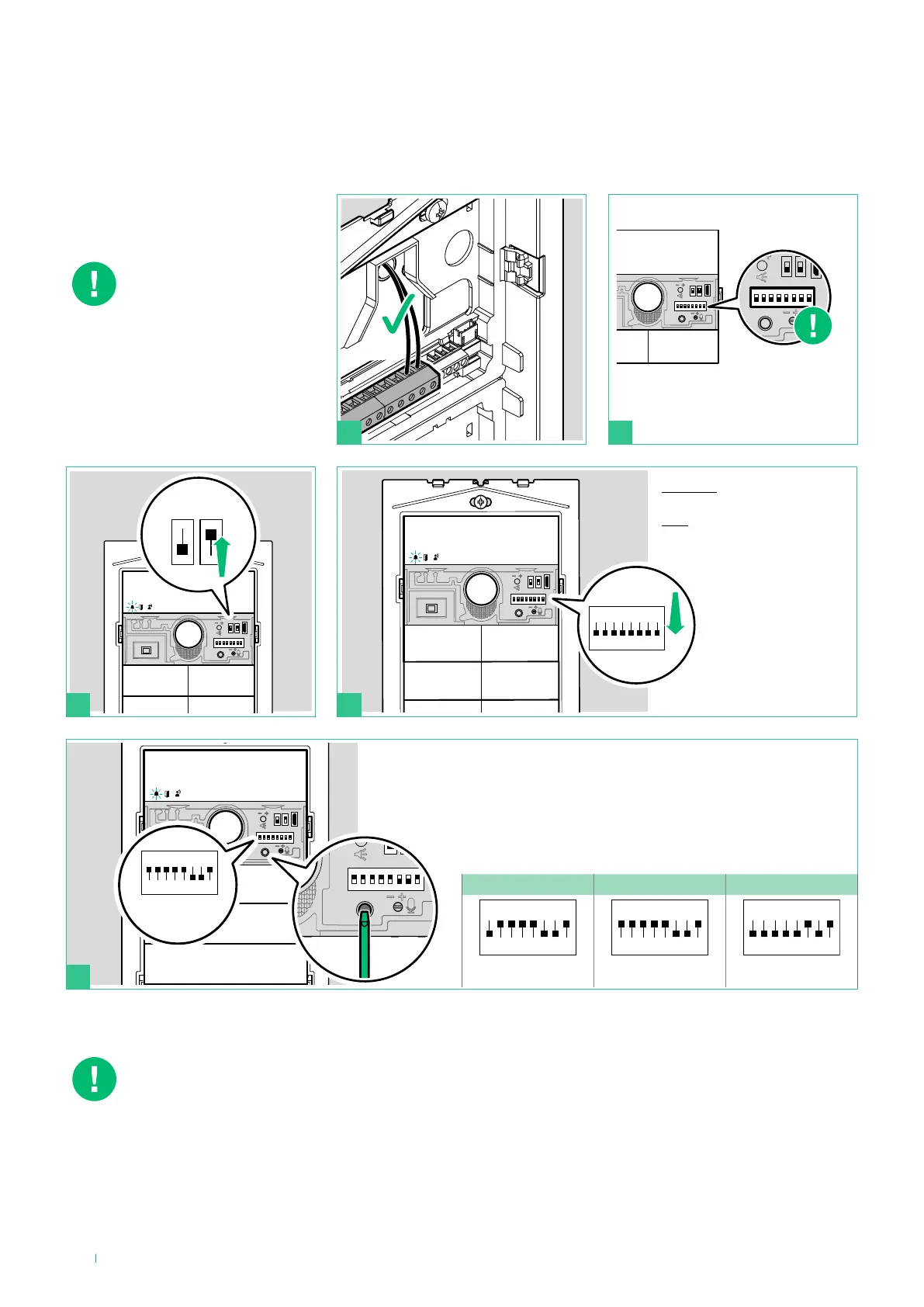
Twilight sensor
Button backlighting management
The twilight sensor is in
AUTO mode by default: the
button LEDs light up at night
and switch off during the
day. To change the setting to
ON (LEDs always on) or OFF
(LEDs always off), proceed
as follows:
NOTE: when the OFF and AUTO lighting modes are active, every time the entrance panel is powered, the
buttons light up for the duration of the start-up phase (10 seconds maximum).
In AUTO mode the twilight sensor checks the ambient light level every 9 minutes; if the measured values
exceed the specified minimum/maximum thresholds, it is activated/deactivated accordingly.
1. Set the desired backlighting mode (OFF, ON or AUTO)
2. Press the confirm button
example:
code 159
Take note of the DIP-switch
settings
BEFORE you proceed:
Set
ALL DIP-switches to OFF,
including DIP 6.











 To Next Page