28
2
1
3
4
5
ON
1 2 3 4 6 75 8
cod. 114
3
S1 S2
2
4
3
2
S1 S2
1
2
3
5
6
1
2
3
3
1
2
1
4
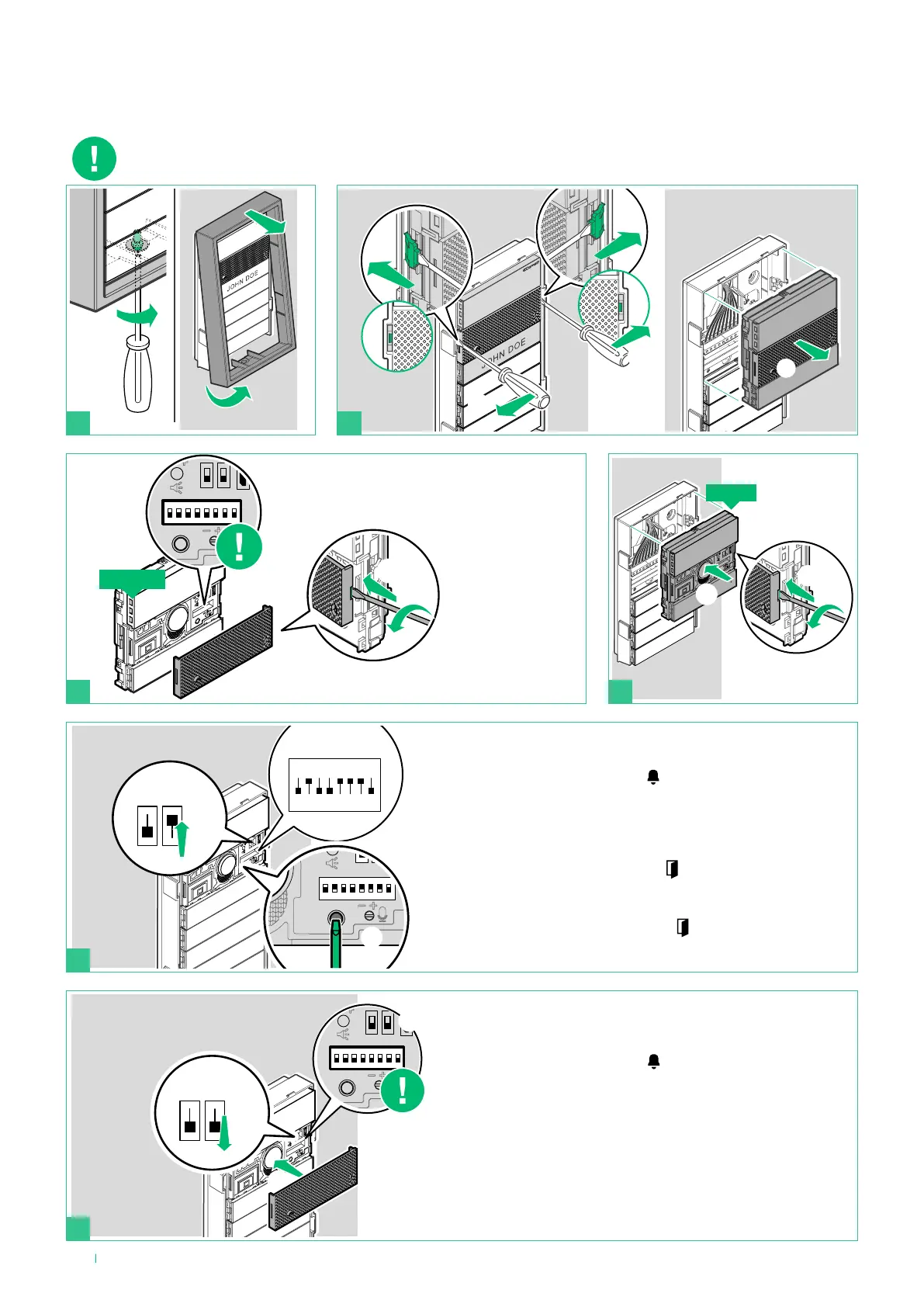
Replacing the audio module with programming restore
backup
Make a note of the DIP-switch
settings
NEW
OLD
1. Exit programming mode by moving the S2 DIP-switch
downwards
» the red “system busy” LED
switches off
2. Reset the configuration of the DIP-switches
3. Reattach the front panel
If the audio module is replaced, the following instructions must be observed.
The procedure should be completed within one hour of removal of the old module.
1. Wait for 90 seconds
2. Enter programming mode by moving S2 DIP-switch upwards
» the red “system busy” LED
flashes for the duration of the
procedure
3. Set special programming 114 to import all the programming
settings
4. Press the confirm programming button
» the green “lock-release” LED
comes on and remains lit
steadily
At the end of the backup:
» The green “lock-release” LED
switches off and if the
procedure was completed successfully, you will hear a
confirmation tone











 To Next Page