EasyManua.ls Logo

Commodore 1541 - Using Relative Files

Commodore 1541
80 pages
Print Icon
To Next Page IconTo Next Page
To Previous Page IconTo Previous Page
Loading...
USING
RELATIVE
FILES
In
order
to
OPEN
a
relative
file
once
it
exists,
the
format
is
simpler.
FORMAT
FOR
OPENING
AN
EXISTING
RELATIVE
FILE:
OPEN
file#,
device^,
channels,
"name"
In
this
case,
the
DOS
automatically
knows
that
it
is
a
relative
file.
This
syntax,
and
the
one
shown
in
the
above
section,
boih
allow
eilher
reading
or
writing
to
the
file.
In
order
to
read or
write,
you
must,
before
any
operation,
position
the
file
pointer
to
the
correct
record
position.
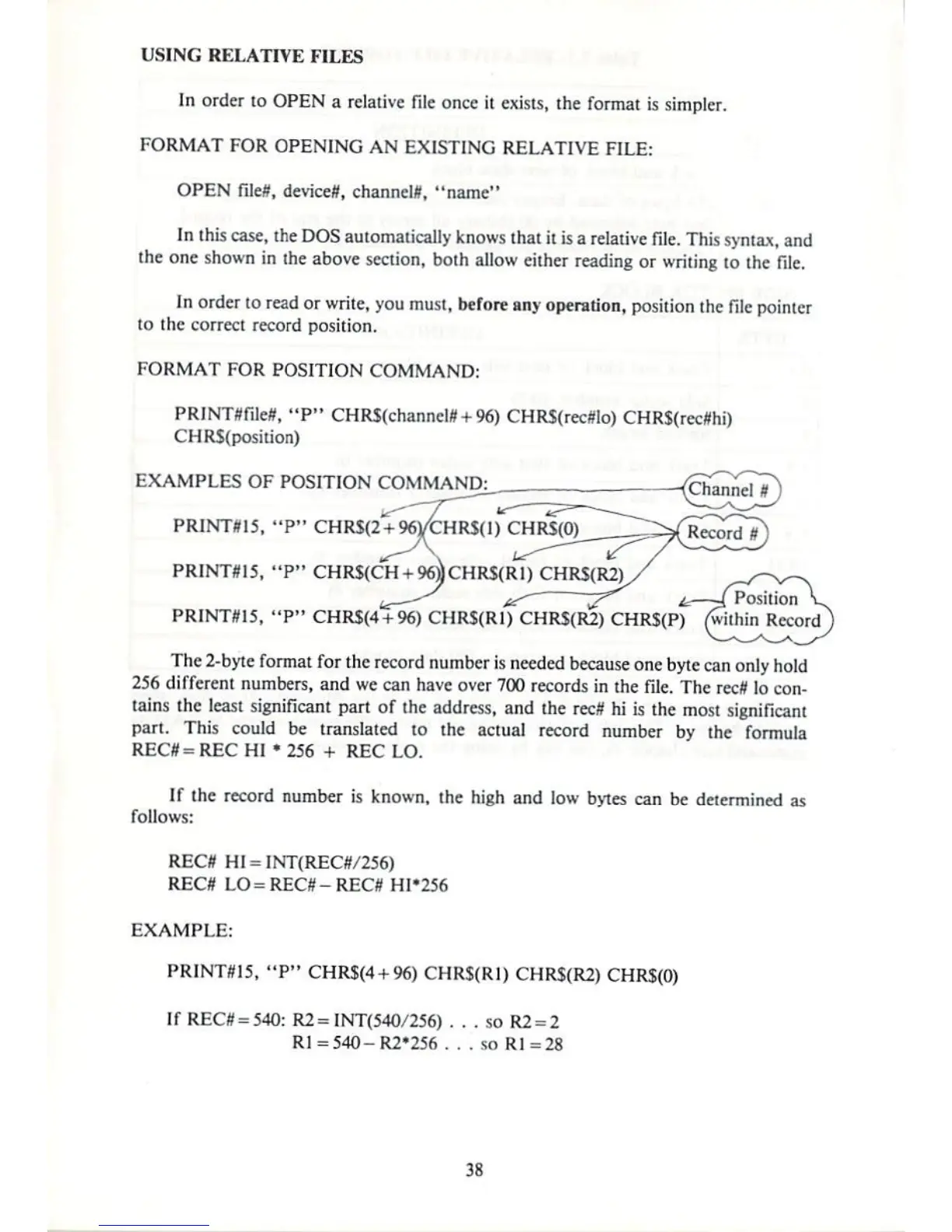
FORMAT
FOR
POSITION
COMMAND:
PRINTSfileS,
"P"
CHRS{channel»
+
96)
CHRS(rec#lo) CHR$(rec#hi)
CHR$(position)
ECAMPLES
OF
POSITION
COMMAND:
PRINTSI5,
"P"
CHR$(2'+96VCHRS(])
CHR$(O)
PRINTSI5,
"P"
CHR$(CH
+
96))CHR$(R1)
CHRS(R2)
tg—^
*r
~^^
i^~l
Position
^
PR1NTS15,
"P"
CHRS(4+96)
CHRS(Rl)
CHRS(R2)
CHRS(P)
(within
Record
The
2-byte
format
for
the
record
number
is
needed
because
one
byte
can
only hold
256
different
numbers,
and
we
can
have
over
700
records
in
the
file.
The
rccfl
lo
con
tains
the
least
significant
part
of
the
address,
and
the
recS
hi
is
the
most
significant
part.
This
could
be
translated
to
the actual
record
number
by
the
formula
REC#
=
REC
HI
256
+
REC
LO.
If
the
record
number
is
known,
the
high
and
low
bytes
can
be determined
as
follows:
RECfl
HI
=
INT{REC#/256)
REC#
LO=REC#-REC#
HI'256
EXAMPLE:
PR1NTS15,
"P"
CHRS(4
+
96)
CHR$(R1) CHR$(R2)
CHR$(0)
If
REC#
=
54O:
R2=
INT(54O/256)
. . .
so
R2
=
2
R1
=
54O-R2'256
. .
.
so
R]=28
38

Other manuals for Commodore 1541

Related product manuals