EasyManua.ls Logo

Commodore 1541 - Hardware Method

Commodore 1541
80 pages
Print Icon
To Next Page IconTo Next Page
To Previous Page IconTo Previous Page
Loading...
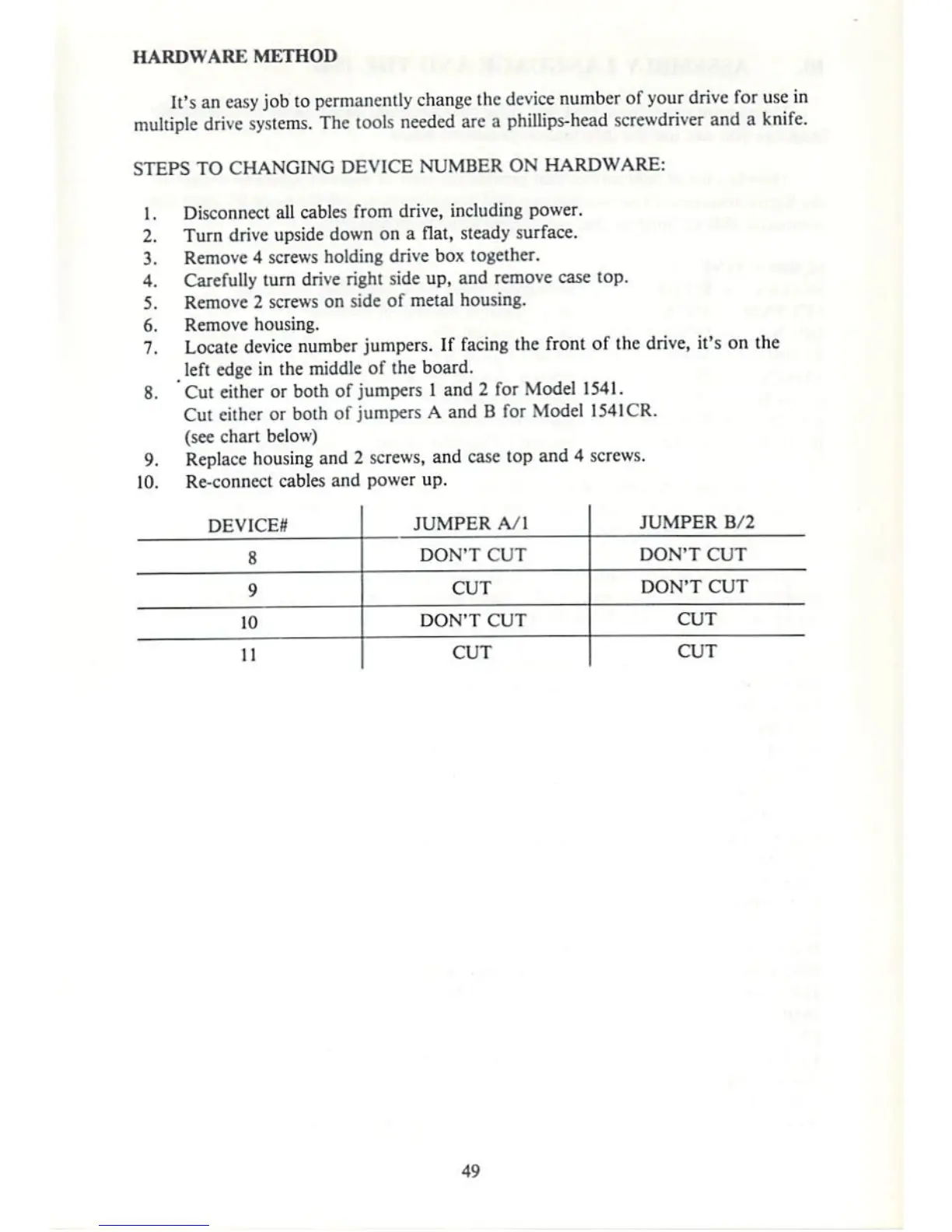
HARDWARE
METHOD
It's
an
easy
job
to
permanently
change
llic
device
number
of
your
drive
for
use
in
multiple
drive
systems.
The
tools
needed
are
a
phillips-head
screwdriver
and
a
knife.
STEPS
TO
CHANGING
DEVICE
NUMBER
ON
HARDWARE:
1.
Disconnect
all
cables
from
drive,
including
power.
2.
Turn
drive
upside
down
on
a
flat,
steady
surface.
3.
Remove
4
screws
holding
drive
box
together.
4.
Carefully
turn
drive
right
side
up,
and remove
case
top.
5.
Remove
2 screws
on
side
of
metal
housing.
6.
Remove
housing.
7.
Locate
device
number
jumpers.
If
facing
the
front
of
the
drive,
it's
on
the
left
edge
in
the
middle
of
the
board.
8.
Cut
either
or
both of
jumpers
I
and
2
for
Model
1541.
Cut
cither
or
both
of
jumpers
A
and
B
for
Model
1541CR.
(see
chan
below)
9.
Replace housing
and
2
screws,
and
case
top
and
4
screws.
10.
Re-connect
cables
and
power
up.
DEVICES
8
9
10
11
JUMPER
VI
DON'T
CUT
CUT
DON'T
CUT
CUT
JUMPER
B/2
DON'T
CUT
DON'T
CUT
CUT
CUT

Other manuals for Commodore 1541

Related product manuals