EasyManua.ls Logo

Commodore 1541 - Connection of Cables

Commodore 1541
80 pages
Print Icon
To Next Page IconTo Next Page
To Previous Page IconTo Previous Page
Loading...
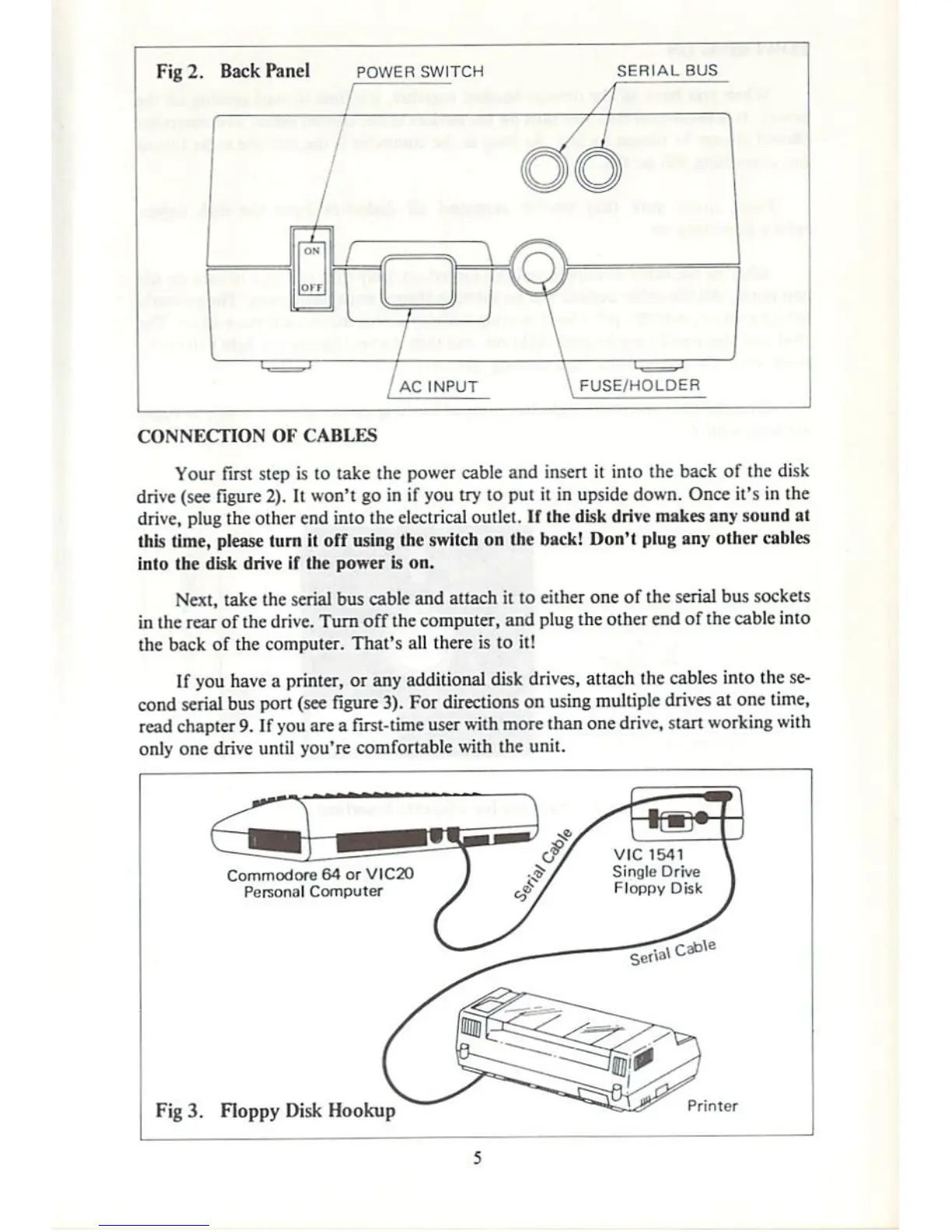
Fig
2.
Back
Panel
POWER
SWITCH
SERIAL
BUS
FUSE/HOLDER
CONNECTION
OF
CABLES
Your
first
step
is
to
take
the
power
cable
and
insert
it
into
the
back
of
the
disk
drive
(see
figure
2).
It
won't
go
in
if
you
try
to
put
it
in
upside
down.
Once
it's
in
the
drive,
plug
the
other
end
into
the
electrical
outlet. IF
the
disk
drive
makes
any
sound
at
this
time,
please
turn
il
off
using
the
switch
on
(he
back!
Don't
plug
any
other
cables
into
Ihe
disk
drive
if
Ihe
power
is
on.
Next,
take
the
serial
bus
cable
and
attach
il
to
either
one of
the
serial
bus
sockets
in
Ihe
rear
of
the
drive.
Turn
off
ihe
computer,
and
plug
the
other
end
of
the
cable
into
the
back
of
the
computer.
That's
all
there
is
to
it!
If
you
have
a
printer,
or
any
additional
disk
drives,
attach
the
cables
into
the
se
cond
serial
bus
port
(see
figure
3).
For
directions
on
using
multiple
drives
at
one
time,
read
chapter
9. If
you
are
a
first-time
user
with
more
than
one
drive,
start
working
with
only
one
drive
until
you're
comfortable
with
the
unit.
Fig
3.
Floppy
Disk
Hookup

Other manuals for Commodore 1541

Related product manuals