READING
THE
DIRECTORY
The
directory
of
the
diskette
may
be
read
just
like
a
sequential
file.
Just
use S
for
the
file
name,
and
OPEN
5, 8, 5,
"S".
Now
the
GETS
statement
works
to
examine
the
directory-
The
format
here
is
identical
to
the
format
of
a
program
file:
the
file
sizes
are
the
line
numbers, and
names
are
stored
as
characters
within
quote
marks.
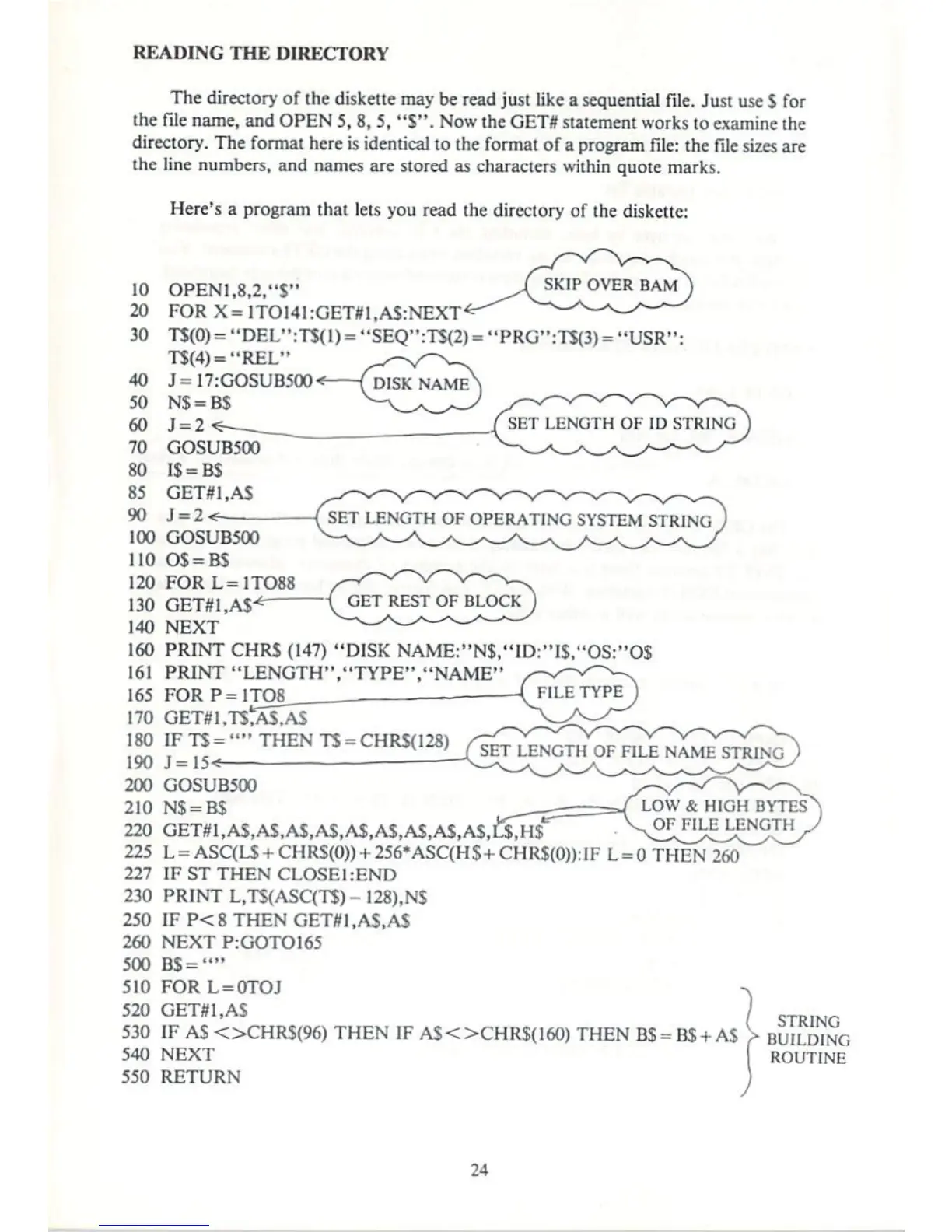
Here's
a
program
thai
lets
you
read
the
directory
of
the
diskette:
10
20
30
OPEN1,8,2,"S"
FORX=]TOI41:GET#1.AS:NEXT<
TS(O)="DEL":T$(l)="SEQ11:TS(2)
= "PRG":TJ(3)
=
"l
T$(4)="REL"
J=
17:GOSUB500*
(
DISK
NAME'
N$
=
BS
SET
LENGTH
OF
ID
STKINd
SET
LENGTH
OF
OPERATING
SYSTEM
STRING
130
GET#1,AS
140
NEXT
160
PRINT
CHRS
(147)
"DISK
NAME:"N$,"ID:"I$."OS:"O$
161
PRINT
"LENGTH","TYPE","NAME"
165
FOR
P=1TO8
170
180
190
200
210
IF
TS
-
■'"
THEN
TS =
CHRS(128)
J=15«
SLT
LENGTH
OF
FILE
NAMfc
LOW
&
HIGH
BYTES
OF
FILE
LENGTH
GOSUB500
N$ =
BS
220
GET#1,AS,AS,AS,A$,A$,A$,AS,A$,AS,C$,H$"
225
L
=
ASC(LS
+
CHR$(O))
+
256'ASC(H$
+
CHR$(O)):IF
L
=
(
227
IFSTTHENCLOSEhEND
230
PRINT
L,TS(ASC(T$)-128),NS
250
IFP<8THEN
GET#1,A$,AS
260
NEXT
P:GOTOI65
500
B$=""
510
FOR
L
=
0TOJ
520
GET#1,AS
530
IF
AS<>CHRS(96)THENIFAS<>CHRS(160)THENBS=B$
+ AS
540
NEXT
550
RETURN
STRING
BUILDING
ROUTINE
24



 To Next Page