EasyManua.ls Logo

Commodore CDTV/P - Page 11

Commodore CDTV/P
40 pages
Print Icon
To Next Page IconTo Next Page
To Previous Page IconTo Previous Page
Loading...
2-2 Setting Up
Your
CDTVIP
System
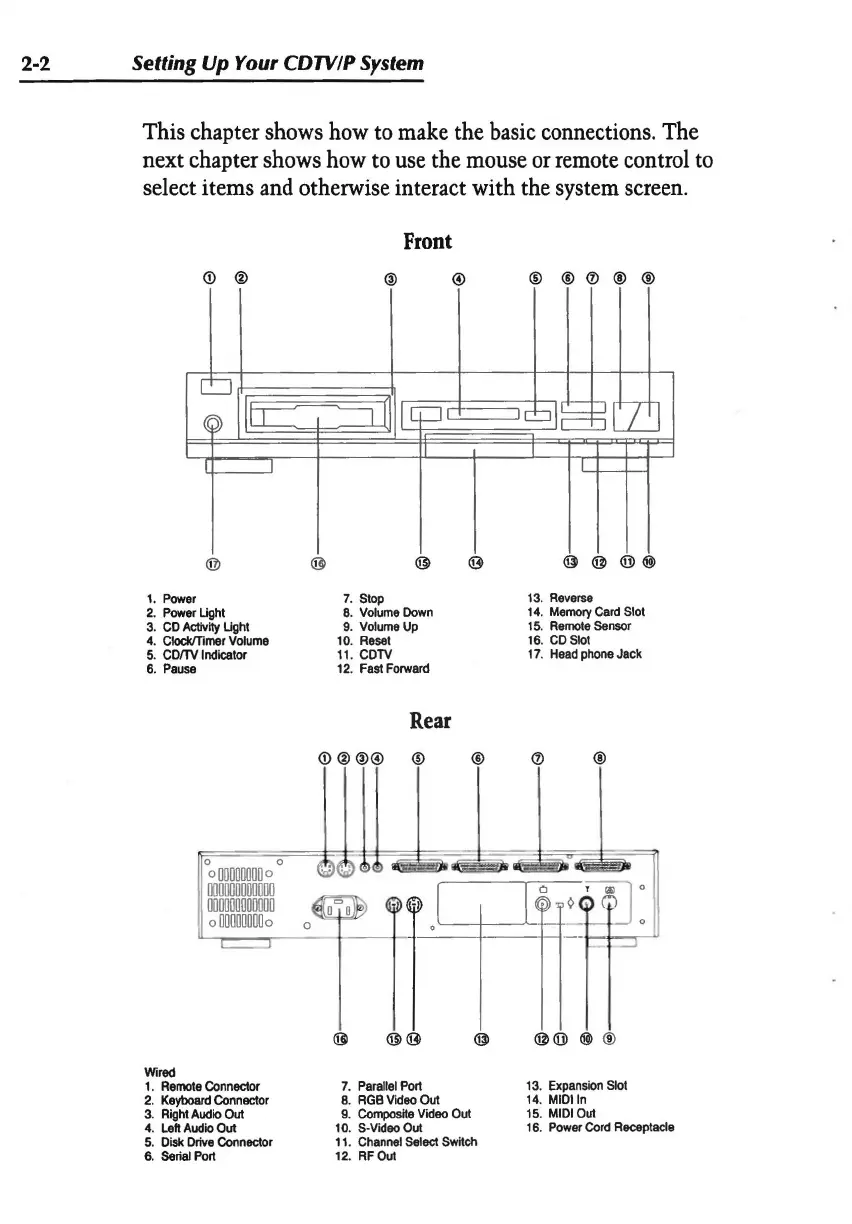
This chapter shows
how
to
make
the
basic
connections. The
next chapter
shows
how
to
use
the
mouse
or
remote
control
to
select items
and
otherwise interact with the system
screen.
Front
© @
@ @
® @
(D@
®
®
@
@
1.
Power
7.
Stop
13.
Reverse
2.
Power
Light
8.
Volume
Down
14.
Memory
Card
Slot
3.
CD
Activity
Light
9.
Volume
Up
15.
Remote
Sensor
4.
Clock/Timer
Volume
10.
Reset
16.
CD
Slot
5.
CDITV
Indicator
11
.
CCTV
17.
Head
phone
Jack
6.
Pause
12.
Fast
Forward
Rear
@
@
@®@)
®
Wired
1.
Remote
Connector
7.
Parallel
Port
13.
Expansion
Slot
2.
Keyboard
Connector
8.
RGB
Video
Out
14. MIDlln
3.
Right
Audio
Out
9.
Compostte
Video
Out
15.
MIDI
Out
4.
Left
Audio
Out
10. $-Video
Out
16.
Power
Cord
Receptacle
5.
Disk
Drive
Connector
11
.
Channel
Select
Swttch
6.
Serial
Port
12. RFOut