Using the CDTV/P
As
An
ASOO
Computer
5-1
5.
Using
the
CDTV/P
As
An
A500
Computer
To
use
the
CDTV
IP
as
an
AS00
computer,
you
must first
connect the
keyboard
and
the disk
drive
to
the
CDTV
/P.
With
the
keyboard,
floppy
drive
and
monitor
or
TV
connected
and
the mouse operational, the assembled
CDTV/P
is
fully
functional
as
an
Amiga
500
(AS00)
computer.
For
complete
details
on
AS00
computer operations, including
keyboard
use,
refer
to the
AS00
computer documentation included with
your
CDTV/P.
Note that
the
power supply
and
power switch
are
built into
the
CDTVIP,
rather
than
being a
separate
component
as
with
the
standard
A500.
Therefore,
for
the
CDTVIP,
all
references
in
the
A500
documentation
to
the
separate power supply/
power switch
component
should
be
interpreted
as
referring
to
the
built-in power supply and power switch of
the
CDTV/P.
Connecting
the
Keyboard
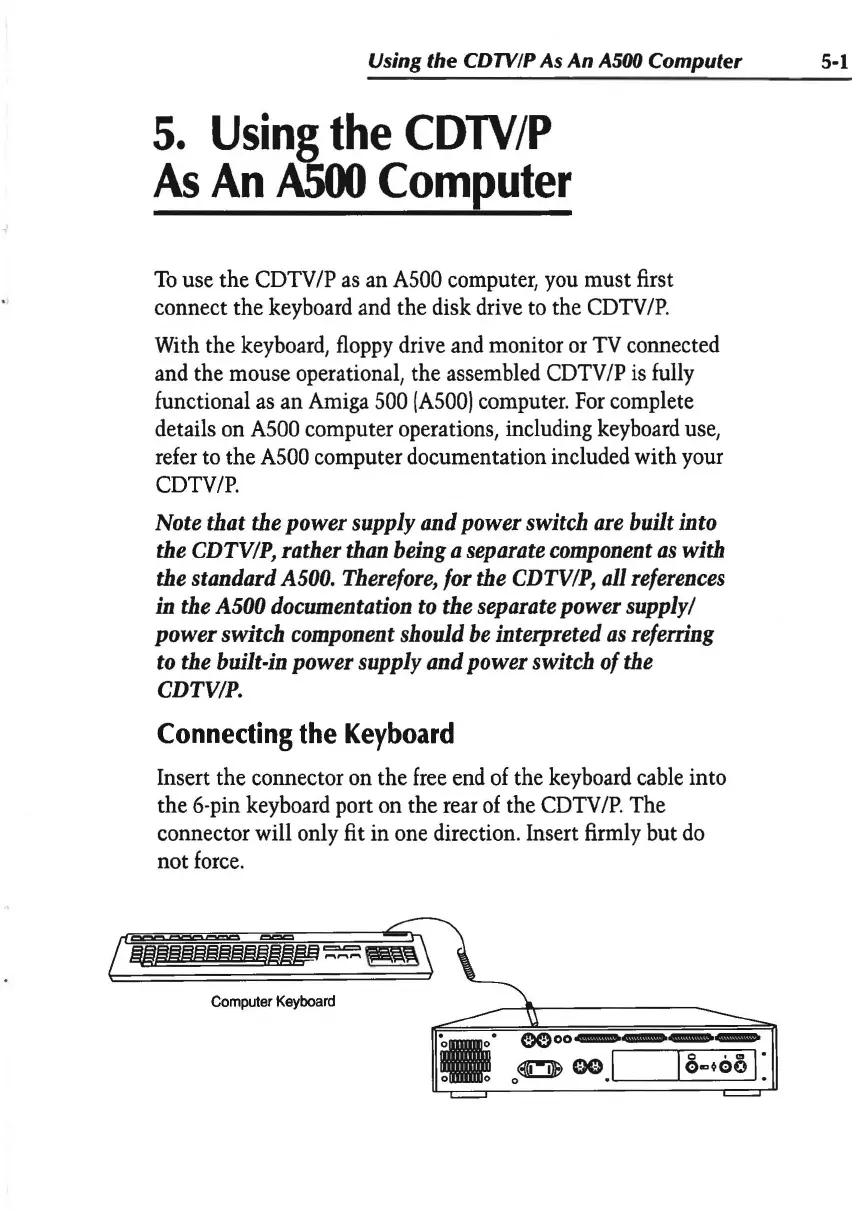
Insert the connector
on
the
free
end
of
the
keyboard
cable
into
the 6-pin
keyboard
port
on
the
rear
of
the
CDTV
/P
. The
connector will only fit in one direction. Insert
firmly
but
do
not
force
.
Computer
Keyboard
•·o•
0 0
GC;)oo,_.,._.,_,_
0
~
oo,I
I
a.,~oo
I:


 To Next Page