EasyManua.ls Logo

Commodore CDTV/P - Cleaning the Mouse

Commodore CDTV/P
40 pages
Print Icon
To Next Page IconTo Next Page
To Previous Page IconTo Previous Page
Loading...
Appendix A A-1
Appendix
A
Cleaning
the
Mouse
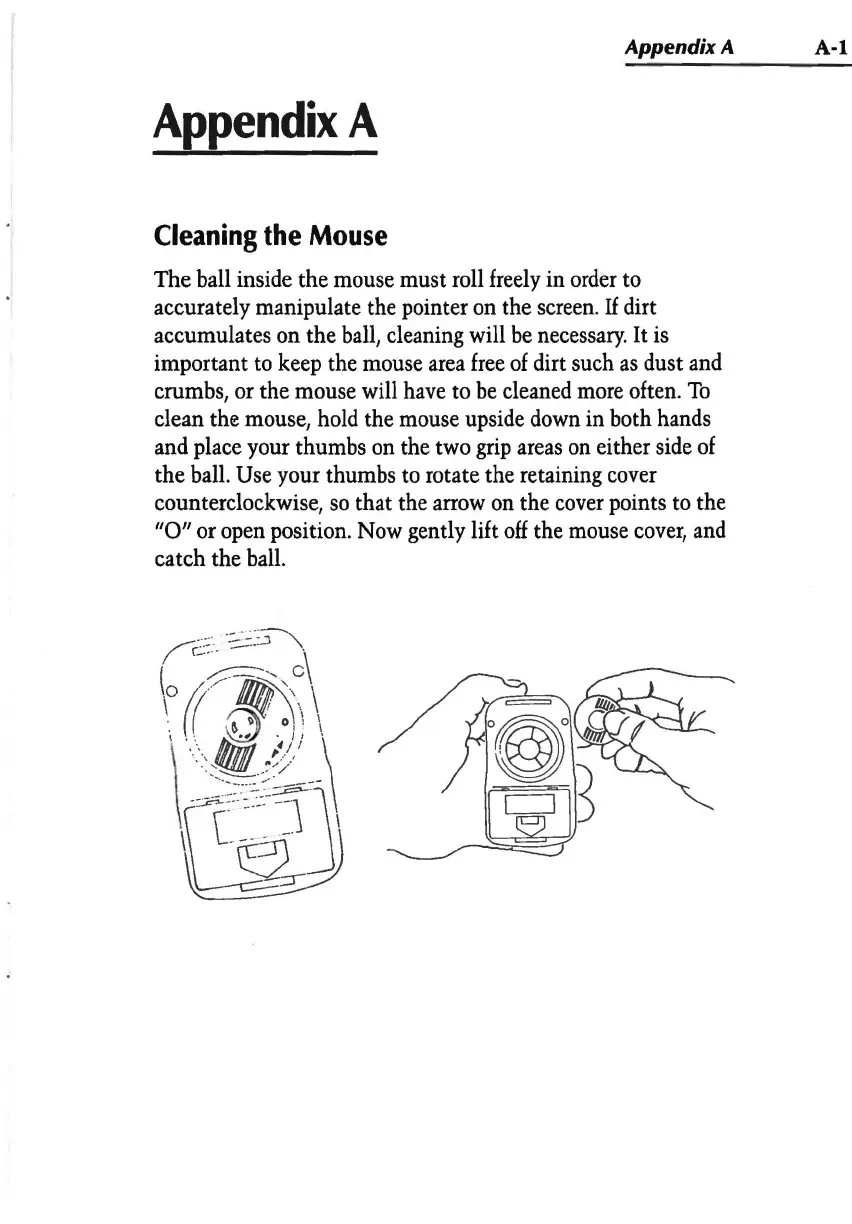
The ball inside the
mouse
must roll
freely
in
order
to
accurately manipulate the pointer
on
the
screen.
If dirt
accumulates on the
ball,
cleaning will
be
necessary.
It
is
important
to
keep
the
mouse
area
free
of
dirt such
as
dust
and
crumbs,
or
the mouse will
have
to
be
cleaned
more
often.
To
clean the
mouse,
hold
the
mouse
upside
down
in
both hands
and
place
your thumbs
on
the two
grip
areas
on
either
side
of
the
ball.
Use
your thumbs
to
rotate the retaining
cover
counterclockwise,
so
that the
arrow
on
the
cover
points
to
the
"0"
or
open
position.
Now
gently lift
off
the
mouse
cover,
and
catch the
ball.