EasyManua.ls Logo

Commodore CDTV/P - Connecting a Television Set

Commodore CDTV/P
40 pages
Print Icon
To Next Page IconTo Next Page
To Previous Page IconTo Previous Page
Loading...
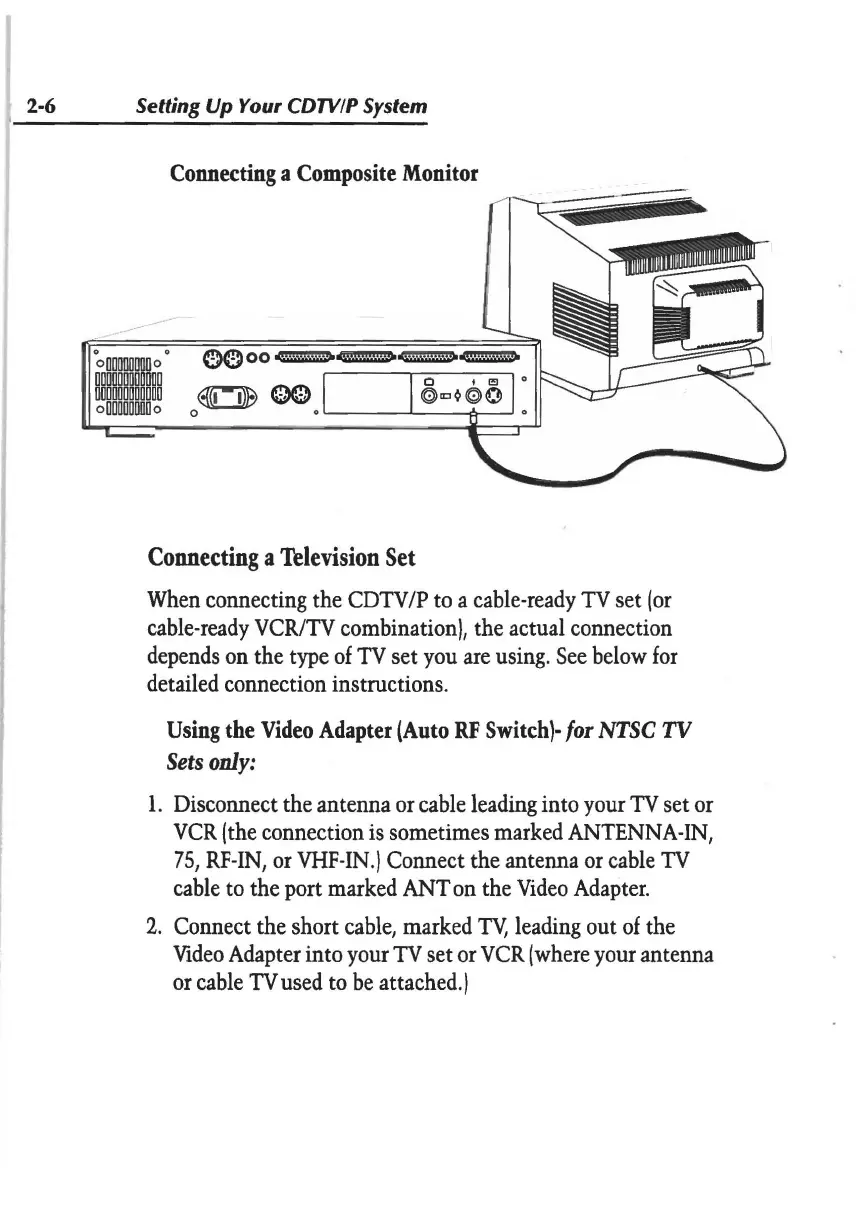
2-6 Setting
Up
Your CDTVIP System
Connecting
a
Composite
Monitor
Connecting
a
Tolevision
Set
When
connecting the
CDTV/P
to
a
cable-ready
TV
set
(or
cable-ready
VCR/TV
combination), the actual connection
depends
on
the
type
of
TV
set
you
are
using.
See
below
for
detailed connection instructions.
Using
the
Video
Adapter
(Auto
RF
Switch}-
for
NTSC
TV
Sets
only:
1.
Disconnect the antenna
or
cable
leading
into
your
TV
set
or
VCR
(the
connection
is
sometimes marked
ANTENNA-IN,
75,
RF-IN,
or
VHF-IN
.) Connect the antenna
or
cable
TV
cable
to
the port marked
ANT
on
the
Video
Adapter.
2.
Connect the short
cable,
marked
TY,
leading
out
of
the
Video
Adapter
into
your
TV
set
or
VCR
(where
your
antenna
or
cable
TV
used
to
be
attached.)