EasyManua.ls Logo

Commodore CDTV/P - Connecting the Display Device; Connecting a Monitor

Commodore CDTV/P
40 pages
Print Icon
To Next Page IconTo Next Page
To Previous Page IconTo Previous Page
Loading...
Setting
Up
Your CDTVIP System
2-5
Connecting
the
Display
Device
To
display
video
information,
you
must connect a
display
device
of
some sort
to
the
CDTV
IP
.
For
professional
use
an
RGB
or
S-VHS
video
monitor is
recommended.
For
less
critical
display
requirements, a composite monitor
or
standard
television set
can
be
used.
The
following
paragraphs
tell
how
to
connect the
CDTV
IP
to
various
types
of
monitors
and
TV
sets,
using
the
video
and
TV
connector ports
on
the
rear
of
the
CDTVIP.
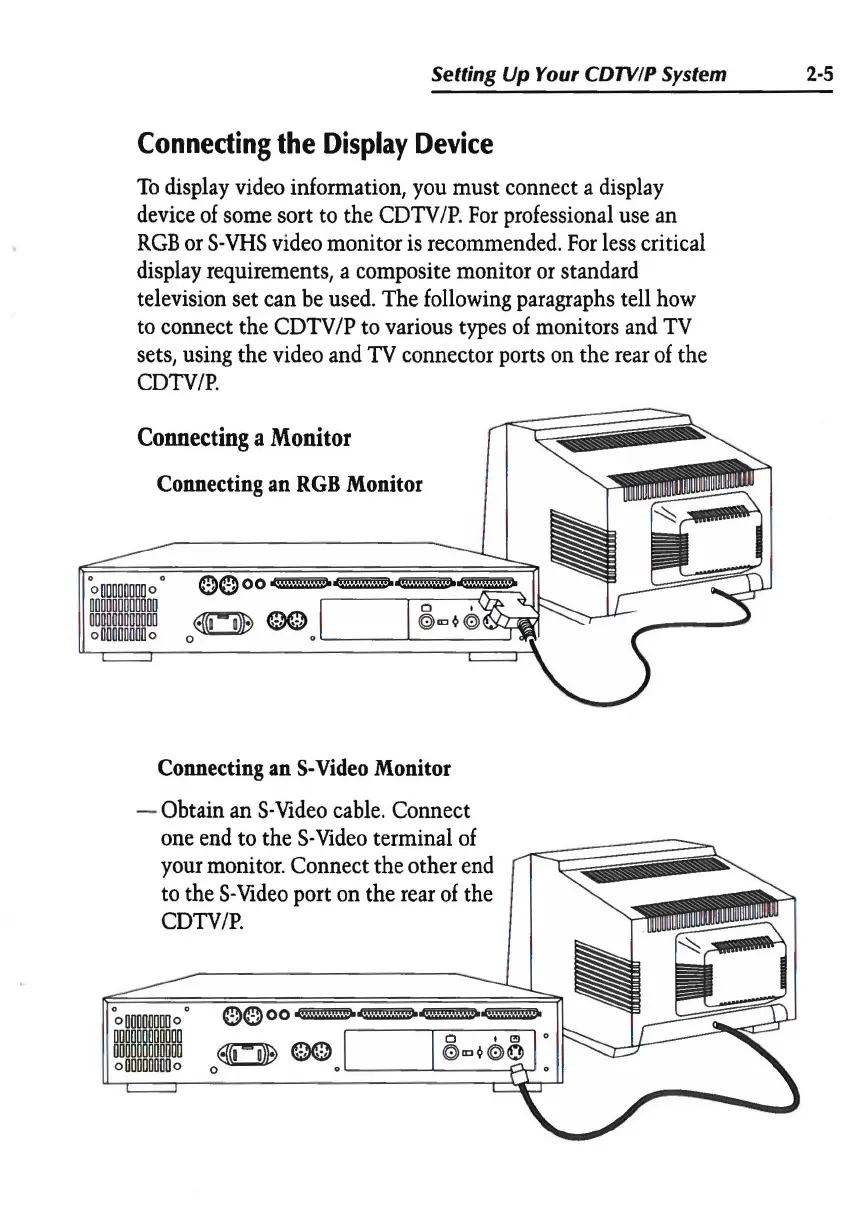
Connecting
a
Monitor
Connecting
an
RGB
Monitor
Connecting
an
S-Video
Monitor
- Obtain
an
S-Video
cable.
Connect
one
end
to
the
S-
Video
terminal
of
your
monitor. Connect the other
end
to
the
S-Video
port
on
the
rear
of
the
CDTVIP.
0000~~~~
0 t
C!J
0
~
00
(0)
(0)
Q
0
~--~--
~