1-4
Getting Started
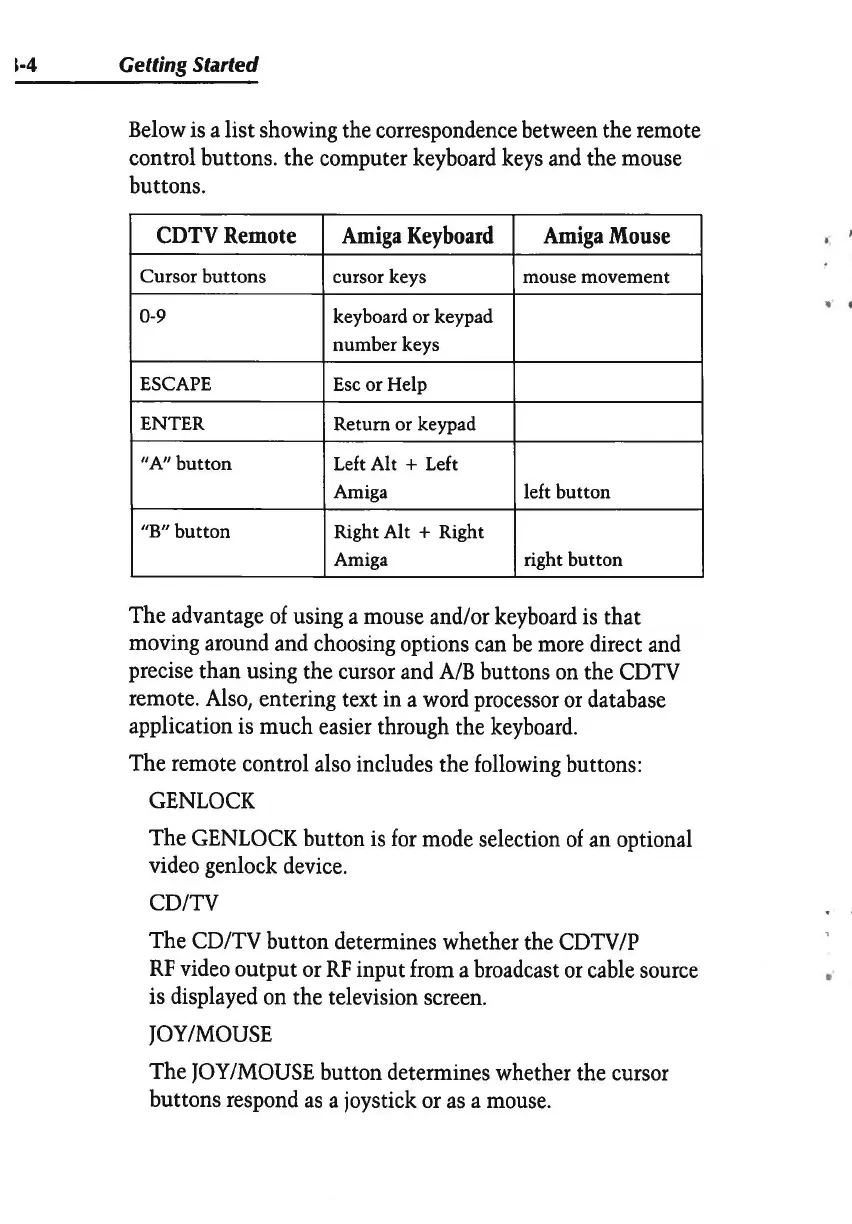
Below
is
a list showing the correspondence between the remote
control buttons. the computer
keyboard
keys
and
the mouse
buttons.
CDTVRemote
Amiga
Keyboard
Amiga
Mouse
Cursor buttons
cursor keys mouse movement
0-9 keyboard or keypad
number keys
ESCAPE Esc or Help
ENTER Return or keypad
"A"
button
Left Alt + Left
Amiga
left button
"B"
button
Right Alt + Right
Amiga
right button
The advantage
of
using a mouse and/or
keyboard
is
that
moving around
and
choosing options
can
be
more
direct
and
precise than using the cursor
and
A/B
buttons
on
the
CDTV
remote.
Also,
entering text
in
a
word
processor
or
database
application
is
much easier through the
keyboard.
The remote control
also
includes the
following
buttons:
GENLOCK
The
GENLOCK
button
is
for
mode
selection
of
an
optional
video genlock
device.
CD/TV
The CD/TV button determines whether the
CDTV/P
RF
video
output
or
RF
input
from
a broadcast
or
cable
source
is displayed
on
the television
screen.
JOY/MOUSE
The
JOY
/MOUSE
button determines whether the cursor
buttons respond
as
a joystick
or
as
a
mouse.
" .
•


 To Next Page