MS-DOS Editing
and
Function Keys
1231
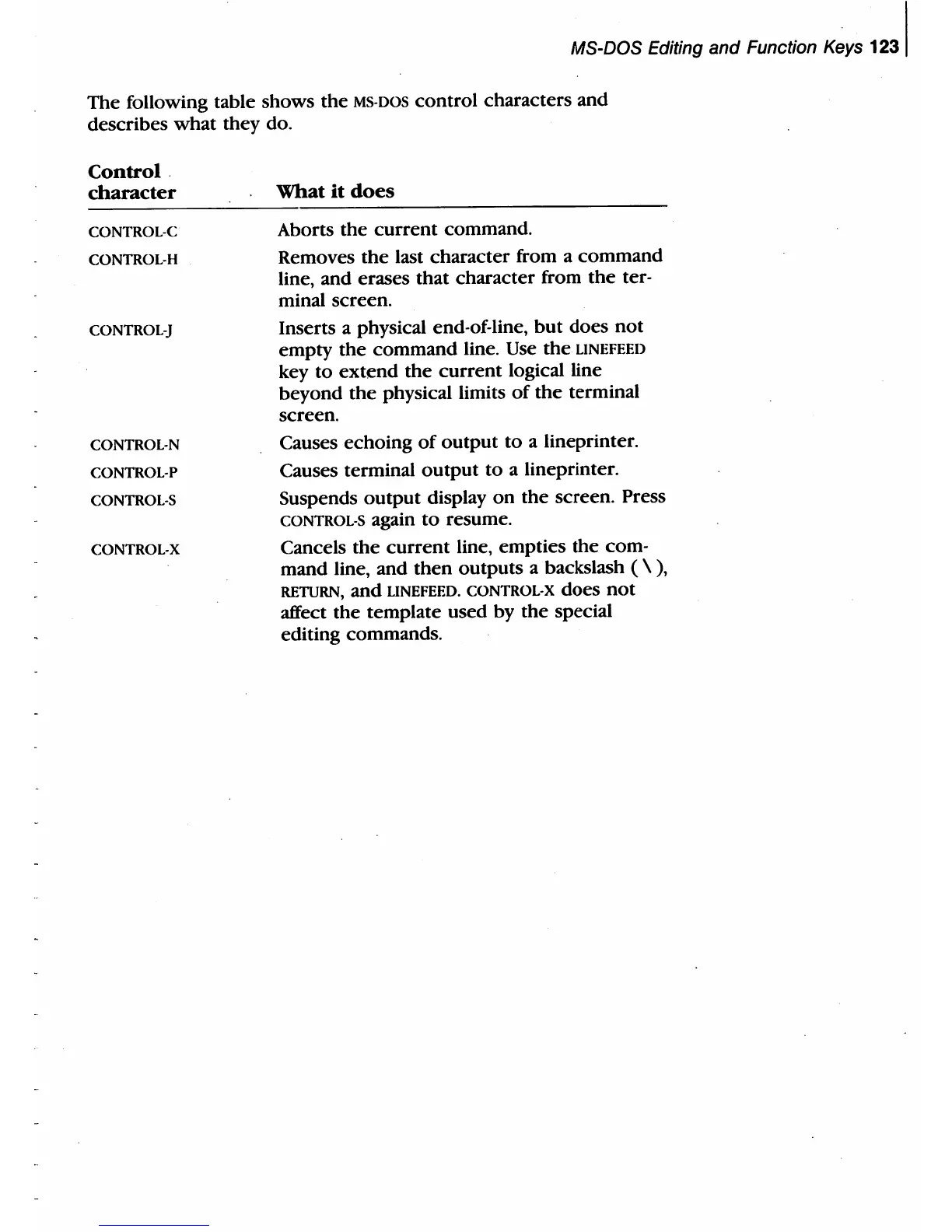
The following table shows
the
MS-DOS control characters and
describes
what
they
do_
Control.
character
CONTROL-C
CONTROL-H
CONTROL-J
CONTROL-N
CONTROL-P
CONTROL-S
CONTROL-X
What
it
does
Aborts the
current
command.
Removes
the
last character from a command
line, and erases that character from
the
ter-
minal screen.
Inserts a physical end-of-line,
but
does
not
empty
the
command line.
Use
the
UNEFEED
key
to
extend
the
current
logical line
beyond
the
physical limits
of
the
terminal
screen.
Causes echoing
of
output
to
a lineprinter.
Causes terminal
output
to
a lineprinter_
Suspends
output
display
on
the
screen. Press
CONTROL-S again
to
resume.
Cancels
the
current
line, empties
the
com-
mand line, and
then
outputs a backslash ( \
),
RETURN, and UNEFEED. CONTROL-X does
not
affect
the
template used by
the
special
editing commands_



 To Next Page