o
o
Video
RAM
Custom
VlSIVldeo
Timing
Generator
Video
Circuitry
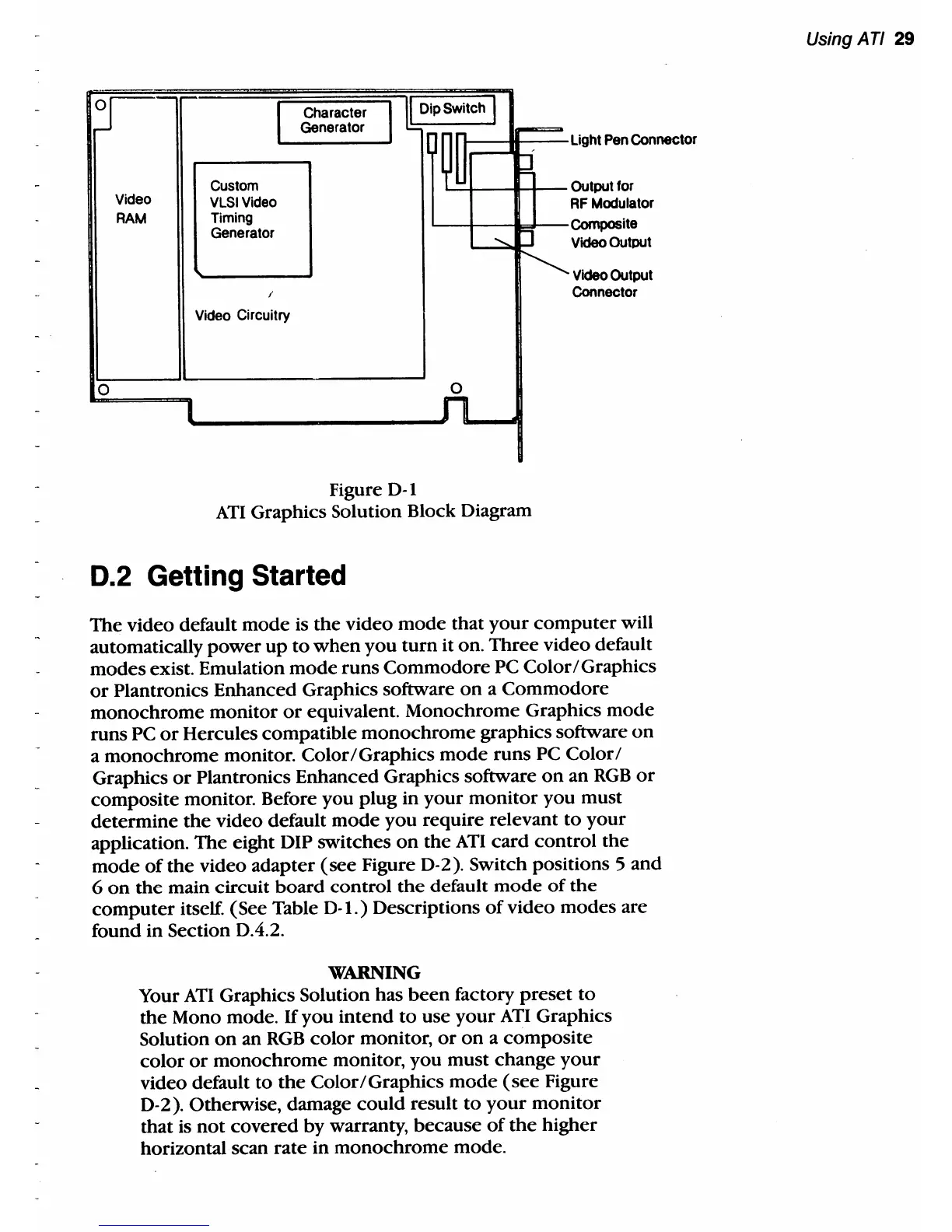
Figure D-I
I-----H----Light
Pen
Connector
L.::..t--f-ll--
Output for
RF
Modulator
'-----I----1
.....
--Composite
o
Video Output
Video
Output
Connector
ATI
Graphics Solution Block Diagram
0.2 Getting Started
The video default
mode
is
the
video
mode
that
your
computer
will
automatically
power
up
to
when
you
turn
it on.
Three
video default
modes
exist. Emulation
mode
runs
Commodore
PC Color / Graphics
or
Plantronics Enhanced Graphics software
on
a
Commodore
monochrome
monitor
or
equivalent. Monochrome Graphics
mode
runs
PC
or
Hercules compatible
monochrome
graphics software
on
a
monochrome
monitor.
Color/Graphics
mode
runs
PC
Color /
Graphics
or
Plantronics Enhanced Graphics software
on
an
RGB
or
composite monitor. Before
you
plug in
your
monitor
you
must
determine
the
video default
mode
you
require relevant
to
your
application.
The
eight DIP
switches
on
the
ATI
card
control
the
mode
of
the
video adapter
(see
Figure
D-
2). Switch positions 5 and
6
on
the
main circuit
board
control
the
default
mode
of
the
computer
itself. (See Table
D-l.)
Descriptions
of
video modes are
found in Section D.4.2.
WARNING
Your
ATI
Graphics Solution has
been
factory
preset
to
the
Mono mode.
If
you
intend
to
use
your
AT!
Graphics
Solution
on
an
RGB
color
monitor,
or
on
a
composite
color
or
monochrome
monitor, you must change
your
video default
to
the
Color/Graphics
mode
(see
Figure
D-
2). Otherwise, damage
could
result
to
your
monitor
that is
not
covered
by
warranty, because
of
the
higher
horizontal scan
rate
in
monochrome
mode.
Using ATI 29



 To Next Page