26
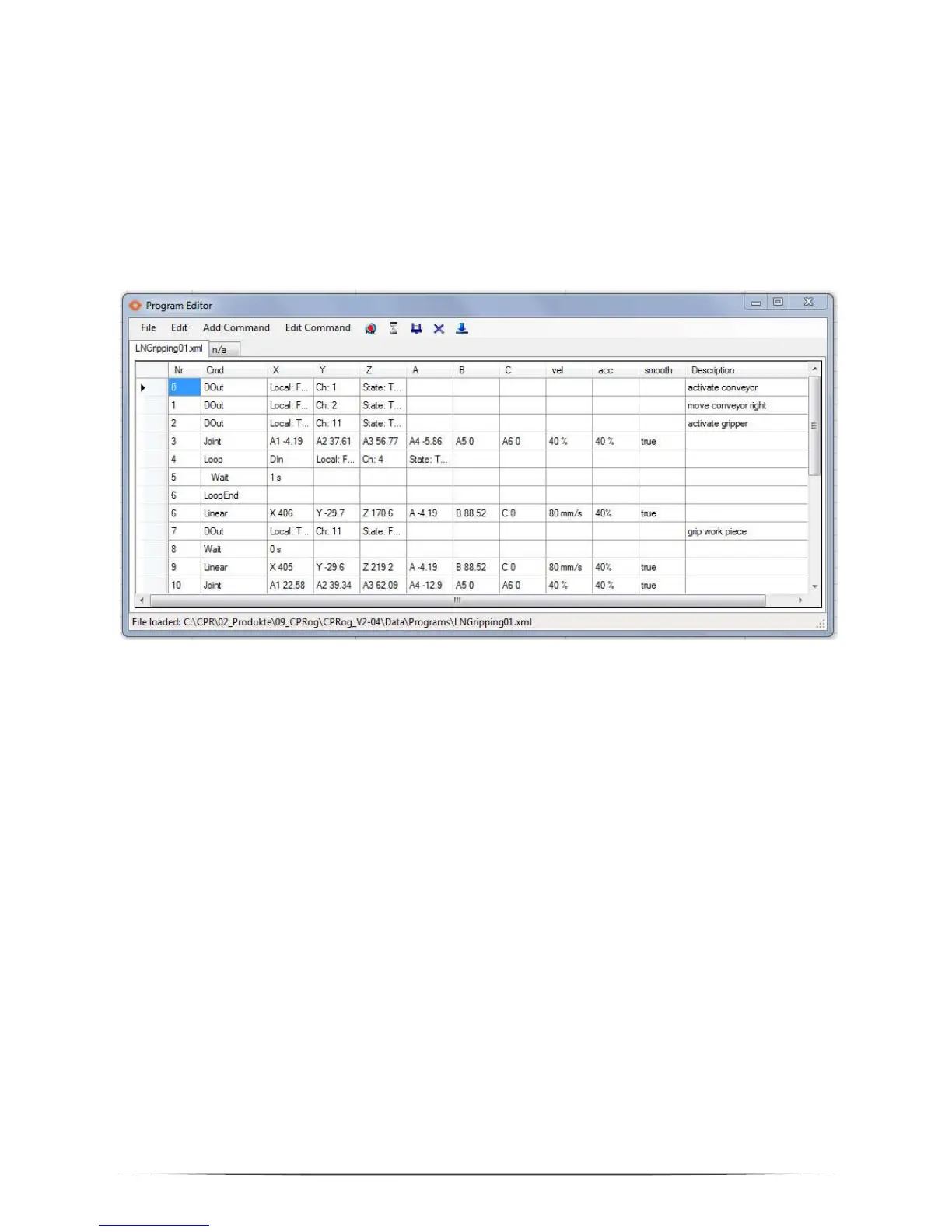
Using the button beneath GraphEdit opens the TextEdit Program editor. This editor
is more usable for bigger programs and provides more information.
The editor contains a syntax check. Illegal cells are marked red, the syntax for the
command is shown in the bottom line as an assistance.
When there are errors in the program it cannot be saved.
The five picture buttons allow direct interaction:
Recording a motion command (lin or joint according to the robots current
motion type) with the current robot position
Recording a break
Recording a gripper command
Deleting the selected line
Setting the selected line as starting point for the next program start
All fields of the commands can be edited directly to e.g. change the velocity.
Changes are accepted when clicking on another line or field. A line can be copied
with Ctrl-C (or in the Edit menu), Ctrl-V pastes the command again.
All new commands are inserted in the line above the selected line.


 To Next Page