INS_CNGE2+2SMS_REV– 02/19/13 PAGE 51
INSTALLATION AND OPERATION MANUAL CNGE2+2SMS[POE][HO]
TECH SUPPORT: 1.888.678.9427
Firmware Upgrade Procedure
Push Bootloader Image Uploader interface
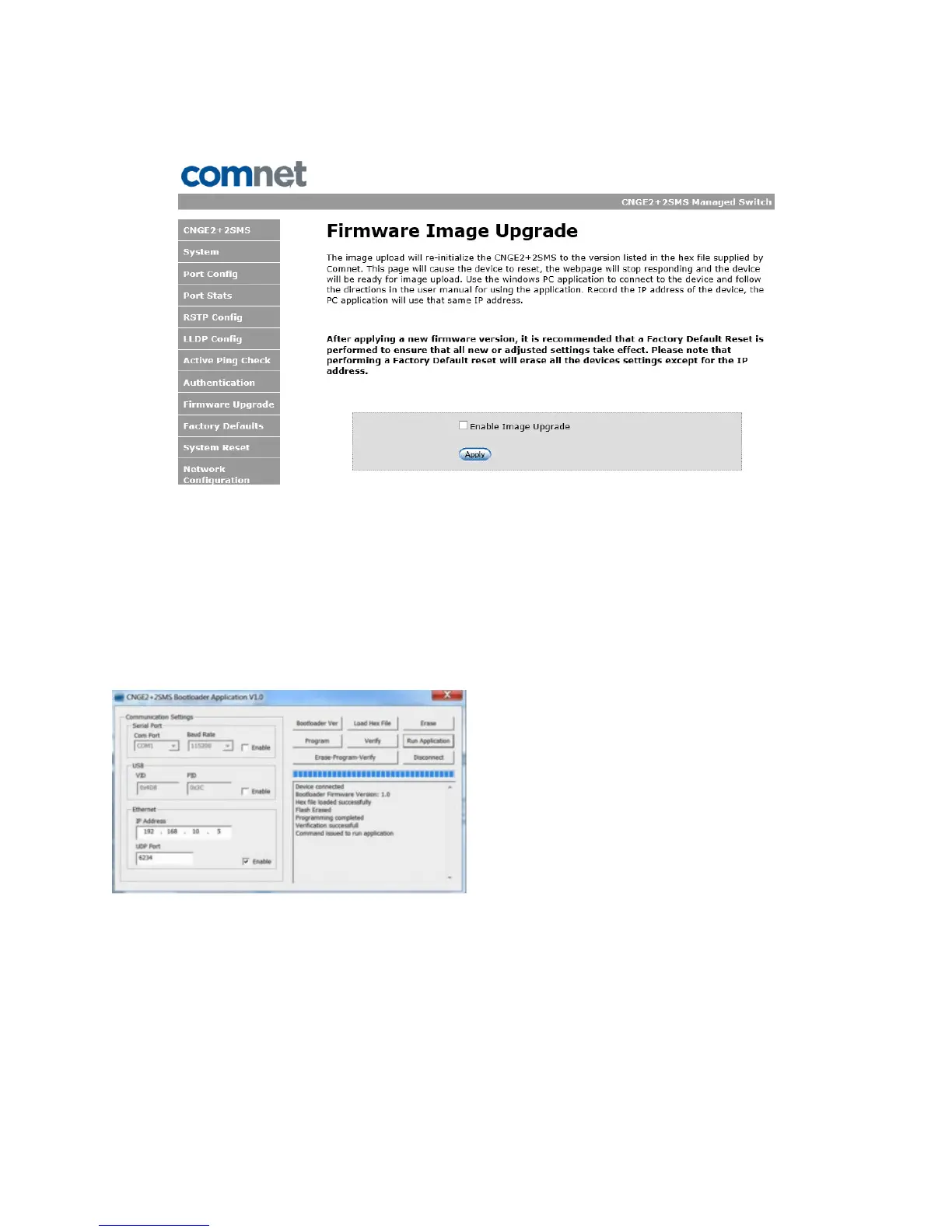
The steps for upgrading the unit with the push boot loader are as follows;
1. Bring up the web server and open the FileSystem Upload page click the Enable Image
upload check box and hit apply.
2. Open the Windows bootloader application, click the enable Ethernet check box and adjust
the IP address to the target IP
3. Click the “Load Hex File” and select the new firmware file.
- Click Erase
- Click Program
- Click Verify
- Click run application
Note: The “Erase-Program-Verify” button is not supported at this time. Please use the
individual buttons.
Warning: Do not enable the firmware update process unless you have a firmware file available and are
ready to upgrade the unit. Once this processed is started it cannot be cancelled and if a new firmware
is not uploaded to the unit it will be necessary to return the unit to the factory for re-programming.



 To Next Page