3) “FREE“ AUTO MODE: the pilot just starts the navigation in auto mode at take off. No other
actions are needed. The instrument draws in the map, in purple color, the best FAI triangle
possible considering the tack in real time already flown. If the pilot wants, he can start the
navigation to close the drawn triangle and update the navigation by touching the same button.
This function needs a little experience in managing the xC-Assistant software and we
recommend to use it after a little experience in using the AUTO MODE.
In any case, the pilot has the possibility, if he is not able to close the Yassen/FAI triangle (or
conditions does not allow him), to close a flat triangle and navigate with it.
Start the navigation
At take off (or in flight if you forgot it), you have to START the NAVIGATION in order to let the
instrument run the xC-Assistant software. Enter in the C-PilotPRO menu and press the TASK button
The TASK page has 2 different options: “COMPETITION TASK” and “FAI TRIANGLE”. Of course, if
you want to run the XC-Assistant, choose the FAI Triangle page by pressing the button.
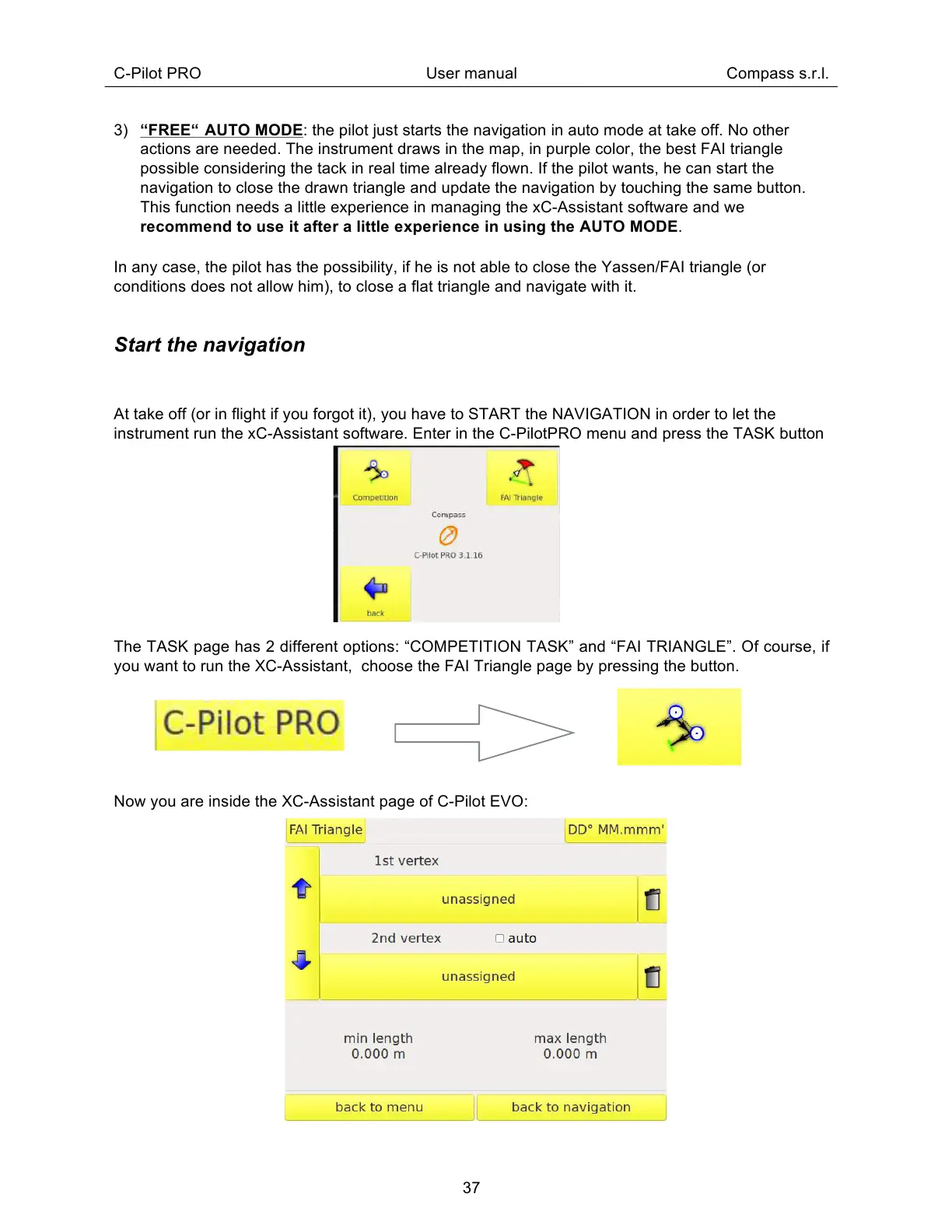
Now you are inside the XC-Assistant page of C-Pilot EVO:



 To Next Page