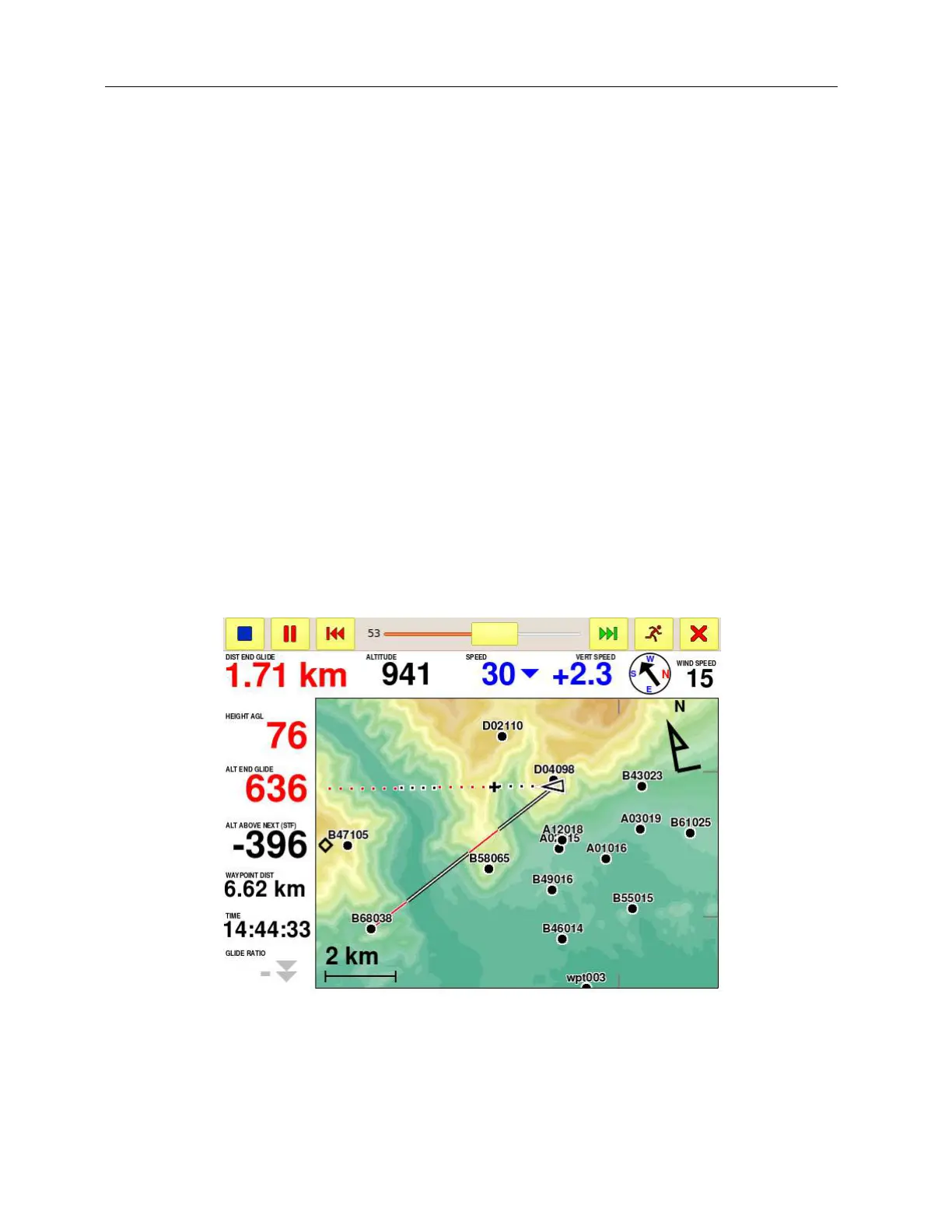
Glide over terrain
C-Pilot EVO offers some innovative features that can be of great help in cross-country flight or
during competitions, thanks to the large amount of memory and the graphic capabilities available.
These make it possible to use high resolution maps to calculate your glide depending on the terrain
of your flight area: you will be able to see at a glance if you can clear an obstacle, at which altitude
you will arrive to the next ridge after crossing a valley, and much more.
The results of these calculations are shown in an immediate and intuitive way on the display, by
means of numerical indications and graphics on the map.
In order for these features to work correctly, you will need to store in your C-Pilot PRO the maps of
your flight area.
Glide along your heading direction
By enabling the “Show heading line” option in the map-setup page (see page 66), C-Pilot EVO will
draw a line in the map that represents your flight direction (Figure 38).
Figure 38: glide over terrain along your heading line and toward a waypoint.
Segments drawn with white dots with black borders show the parts of your glide where this is
calculated (at the speed to fly and taking into account the estimated wind) to be above ground level.
White dots with red borders show where your glide is below ground level. A black cross with white
border (+) indicates where you will touch ground.



 To Next Page