DMD1050 Satellite Modem Board Rear Panel Interface
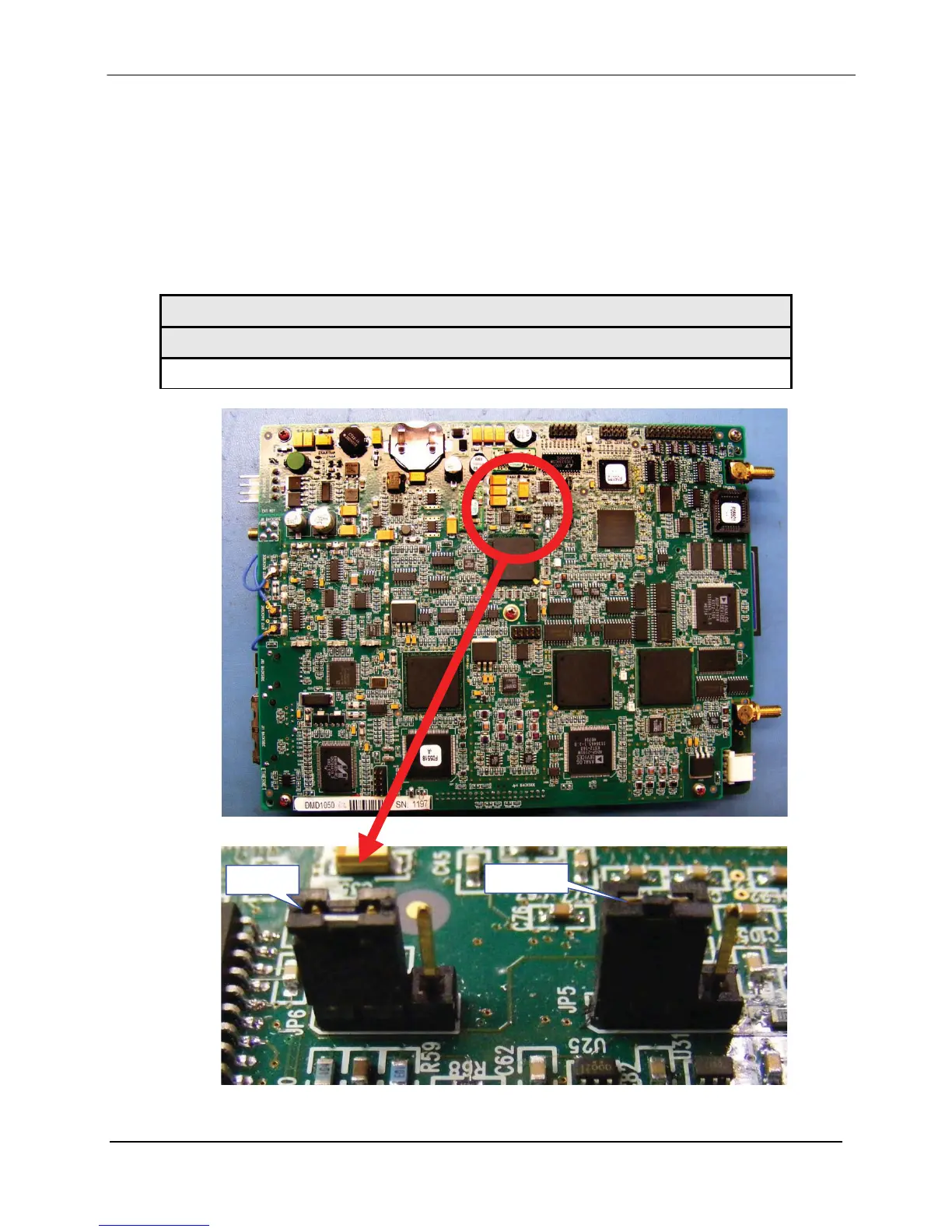
4.4.4.1 Default/Shorting Plug (JP5 JP6) - 3 Pin Male Connector
If user is experiencing difficulty accessing the Web Browser or the Terminal Interface, the user
can reset the M&C interface settings by utilizing the supplied default plug (CNRSHUNT). By
installing the default plug across pins 1 and 2 of JP5 & JP6 connector and cycling power, the
interface default settings will be reset. Default jumper/shunts are supplied with the supplied
connector kit. The default jumper may be installed between pins 2 and 3 and user can reposition
the jumper across pins 1 & 2. Once default settings have been activated, remove Jumpers.
Table 4-2-1. Default/Reset connections: 3-Pin male Connector (JP5 & JP6)
Install shunt/jumper Between Pin No.
Pin 1 & 2
Figure 4-5a
Pin 1
Pin 1
Figure 4-5b
MN-DMD1050 4–7
Revision 9



 To Next Page