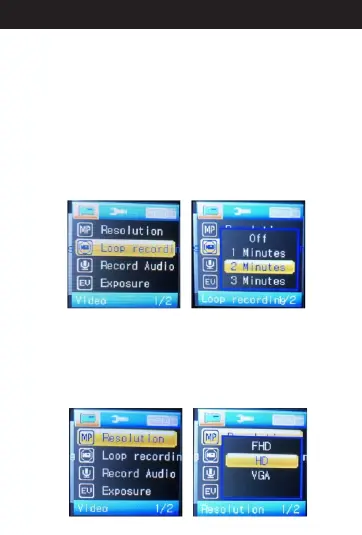
When in standby mode, press “menu” button into menu
items and select “Loop recording”.Then press “OK”.
You'll see “Off”,“Three Minute,”“Five Minute” ,and “Ten
Minute” options. If you choose “Off”, it will turn off the
loop recording function. When the card is full, the
camera will turn off automatically. If you choose “Three
Minute”, “Five Minute”,or“Ten Minute” option, when
the card is full, the newest video will overwrite the
oldest one.“Three Minute” means that each video clip
is 3 minutes long. “Five Minute” for 5-minute video clip,
“Ten Minute” for 10-minute video clip.
5. A Loop Recordingbout
6. A Resolutionbout
When in standby mode, press the menu button into
menu items and select “Resolution” .Then press “OK”
.You'll see “FHD” “HD” and “VGA”options. Select the
resolution you need and press “OK” to save the
setting. When finished, press the menu button two
times back to standby mode.
13
Directions for your Conbrov T17 Camera



 To Next Page