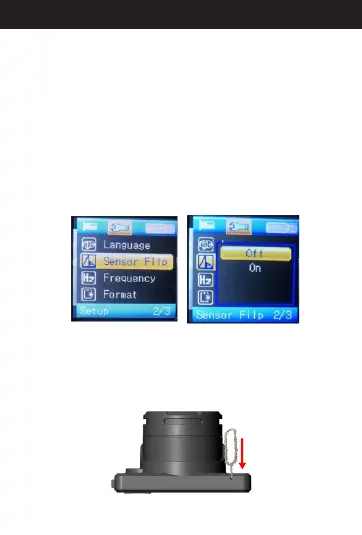
15. A Sensor Flipbout
When in standby mode, press menu button two times
to menu items and select “Sensor Flip” .Then, press
“OK.” You'll see “Off” and “On” options. When you
choose “Off”, videos won't rotate with the direction of
the camera when recording, in this case, the video
would be upside-down. If you choose “On” ,videos will
rotate with the direction of the camera when recording.
Select the option you need and press “OK” to save the
setting. Then it will take effect when restart. When
finished, press the menu button two times back to
standby mode.
Note: After setting Sensor Flip, you need to restart the camera.
16. A Resettingbout
There is a small reset button on the edge of the
camera. You can use the included pin to push the
reset button to reset. When resetting successfully,
the camera will turn off right away. Then, you need to
press the power button to turn on the camera again.
19
Directions for your Conbrov T17 Camera



 To Next Page