17. A Video Previewbout
When in standby mode, press menu button to menu
items, and press and hold the MODE button to enter
into the Video Preview Interface. Then, press “up”
and “down” buttons to select videos. Press “OK” to
start playing the video. During video playback,
pressing “OK” button will stop playing the video.
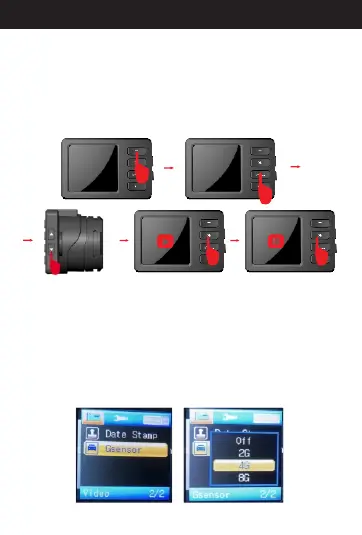
18. A G Sensorbout
When in standby mode, press menu button to menu
items and select “G sensor”. Then press “OK”. You'll
see “Off”,“2G”,“4G” ,and “8G”options. If you choose
“Off”, it will turn off the G sensor function.“2G”, “4G”
and “8G” mean different sensitivities. You can select
the sensitivity you need and press “OK” to save the
setting. When finished, press the menu button two
times back to standby mode.
20
Directions for your Conbrov T17 Camera



 To Next Page