60 61
GALLERY
OPENING THE GALLERY
From the home screen, select > Gallery to view albums of your pictures
and videos.
WORKING WITH ALBUMS
When you open Gallery, all pictures and videos on your phone are displayed
in a number of albums. Scroll up and down to see them all.
Viewing Album Contents
Select an album to view the pictures and videos it contains.
Sharing Pictures or Videos
1. Open an album.
2. Select > Multi-Select.
3. Highlight each item you want to share, and press the OK Key to select it.
4. Select > Share and select a sharing option.
Deleting Albums, Pictures, or Videos
1. Open the Gallery to view your albums, or open an album.
2. Select > Multi-Select.
3. Highlight each item you want to delete, and press the OK Key to select it.
4. Select > Delete > OK.
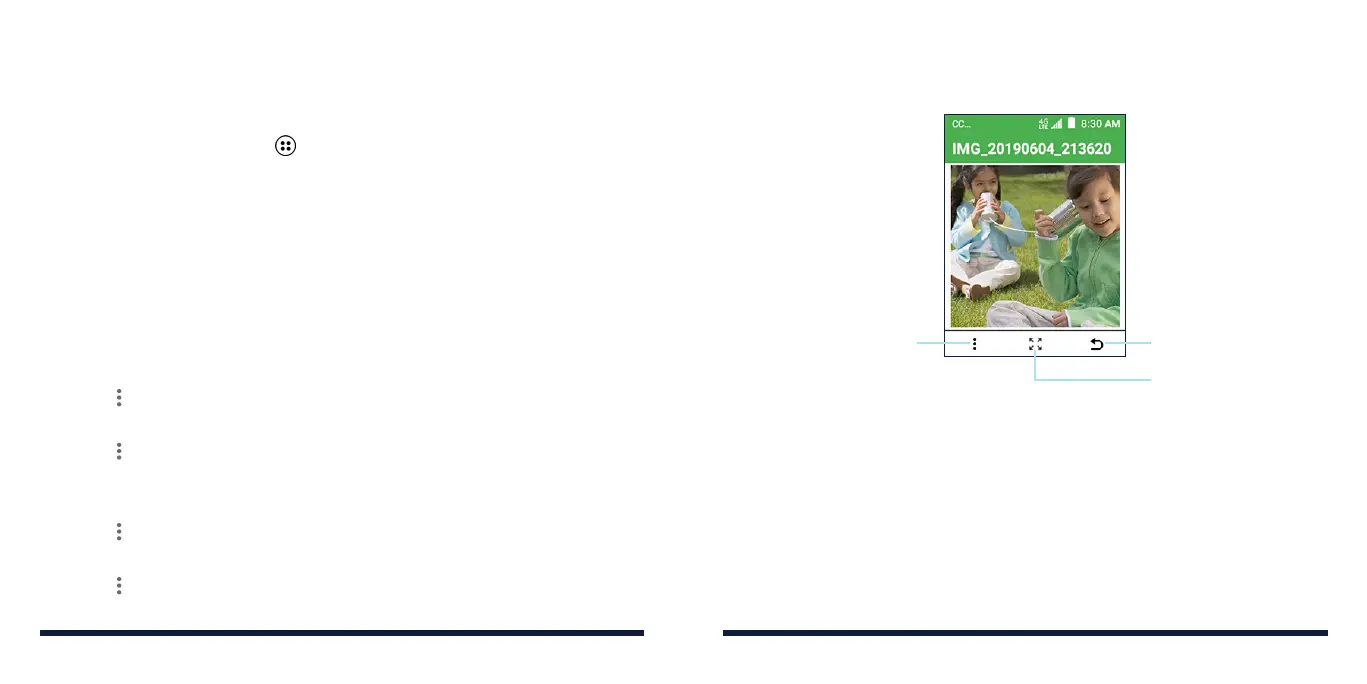
WORKING WITH PICTURES
Open an album and select a picture to view it.
Press the Left Soft
Key to view options
for the current
picture: delete, share,
view details, set as
wallpaper or contact
photo, or view album
as a slideshow
Press the Right
Soft Key to return
to the album
Press the OK Key
to view the picture
in full screen
NOTE: Press left or right on the 4-way Navigation Key to browse other
pictures and videos in the album.
PLAYING VIDEOS
1. Open an album.
2. Select a video.
3. Press the OK Key to play the video.
GALLERY



 To Next Page