14 15
GETTING STARTED
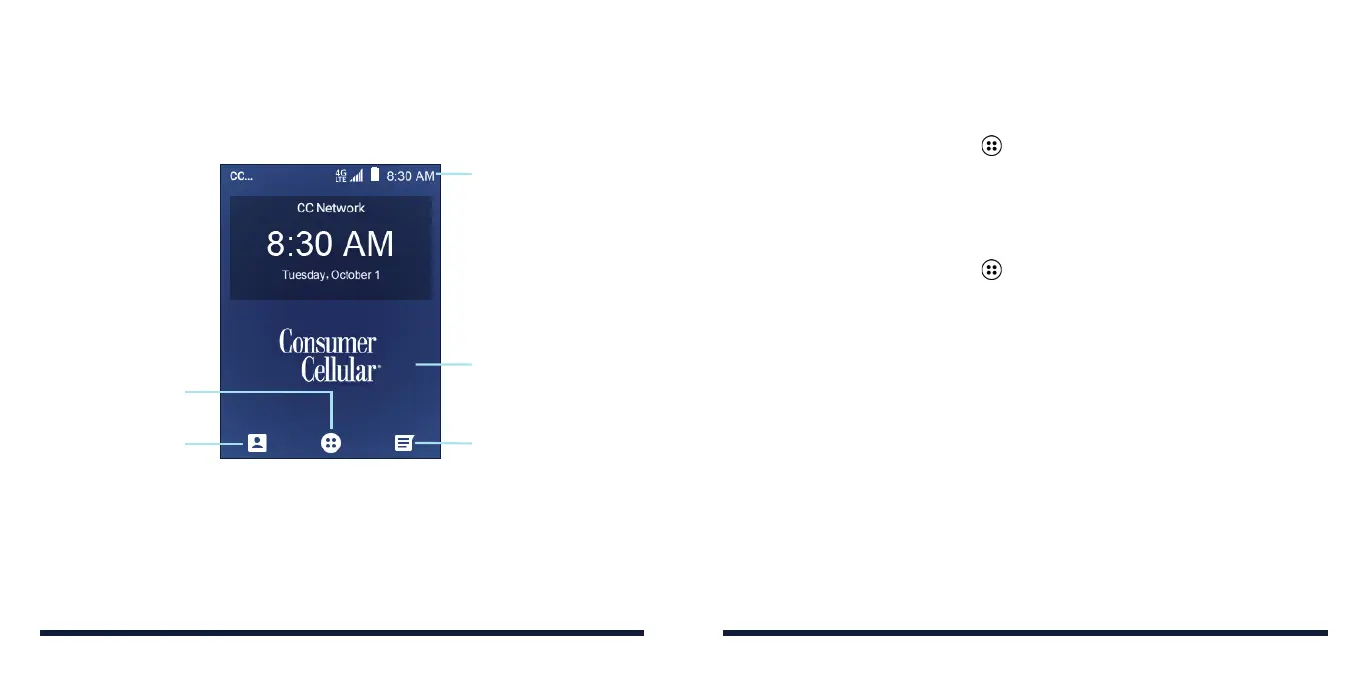
GETTING TO KNOW THE HOME SCREEN
The home screen is the starting point for your phone’s applications, functions,
and menus. You can customize your home screen by adding shortcuts,
folders, widgets, and more.
Contacts
Status and
Notification Bar
Wallpaper
Messages
Apps Menu
PERSONALIZING
CHANGING THE SYSTEM LANGUAGE
1. From the home screen, select > Settings > Device > Languages & input
> Languages.
2. Select the language you need and press the OK Key.
SETTING THE DATE AND TIME
1. From the home screen, select > Settings > Device > Date & time.
2. Set the date, time, time zone, and time format.
• To adjust the date and time automatically, press the OK Key to turn on
Automatic date & time.
• To adjust the date and time manually, press the OK Key to turn off
Automatic date & time and select Set date / Set time to change the
date and time.
• To adjust the time zone automatically, press the OK Key to turn on
Automatic time zone.
• To adjust the time zone manually, press the OK Key to turn off Automatic
time zone and select Select time zone to set the correct time zone.
• To adjust the time format, press the OK Key to turn on or off Use 24-
hour format.



 To Next Page