62 63
MUSIC
From the home screen, select > Multimedia > Music to play audio files
stored on your phone or microSDHC card (if one is installed.)
VIEWING YOUR MUSIC LIBRARY
Open Music and your music library is displayed. All your audio files are
categorized according to artist and album. You can also select All Songs or
Playlists to see all the audio files or the playlists you have created.
NOTE: If a track is being played, select Now Playing to open the playback screen.
PLAYING MUSIC
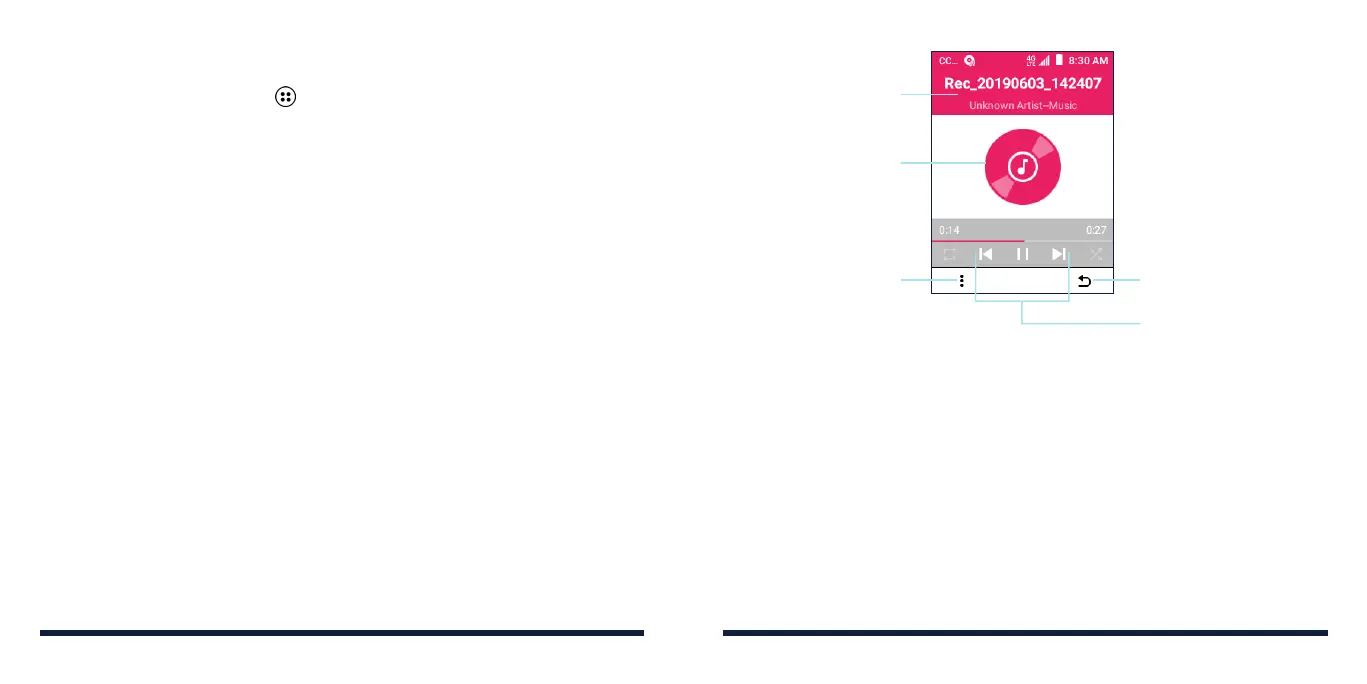
Select a song in the music library to listen to it. The following playback screen
will appear.
Press the Right Soft Key
to return to the previous
screen
Playback controls
(details below)
Press the Left Soft Key
for more options: Now
Playing List, Repeat,
Shue, Track Info,
or Exit
Song, album and
artist information
Album artwork
(if available)
• To pause or resume playback, press the OK Key.
• To play the previous song, press left on the 4-way Navigation Key.
• To skip to the next song, press right on the 4-way Navigation Key.
• To rewind, press and hold left on the 4-way Navigation Key.
• To fast-forward, press and hold right on the 4-way Navigation Key.
MUSIC



 To Next Page