64 65
MANAGING PLAYLISTS
Create playlists to organize your music files into sets of songs, so that you can
play the songs you like in the order you prefer.
• From any music library category, highlight a song and select > Add to
playlist to add the song to a playlist or create a new playlist.
• From the music library, select Playlists, highlight a playlist and select >
Rename or Delete > OK to rename or delete the playlist.
• Open a playlist and select > Add Songs to add more songs to the playlist,
or highlight a song and select > Remove to delete it from the playlist.
VIDEO
Use the Video app to manage your video library and to watch videos.
OPENING THE VIDEO LIBRARY
From the home screen, select > Multimedia > Video. Scroll up or down to
view the video files.
PLAYING AND CONTROLLING VIDEOS
Open the Video app and select a video to play it.
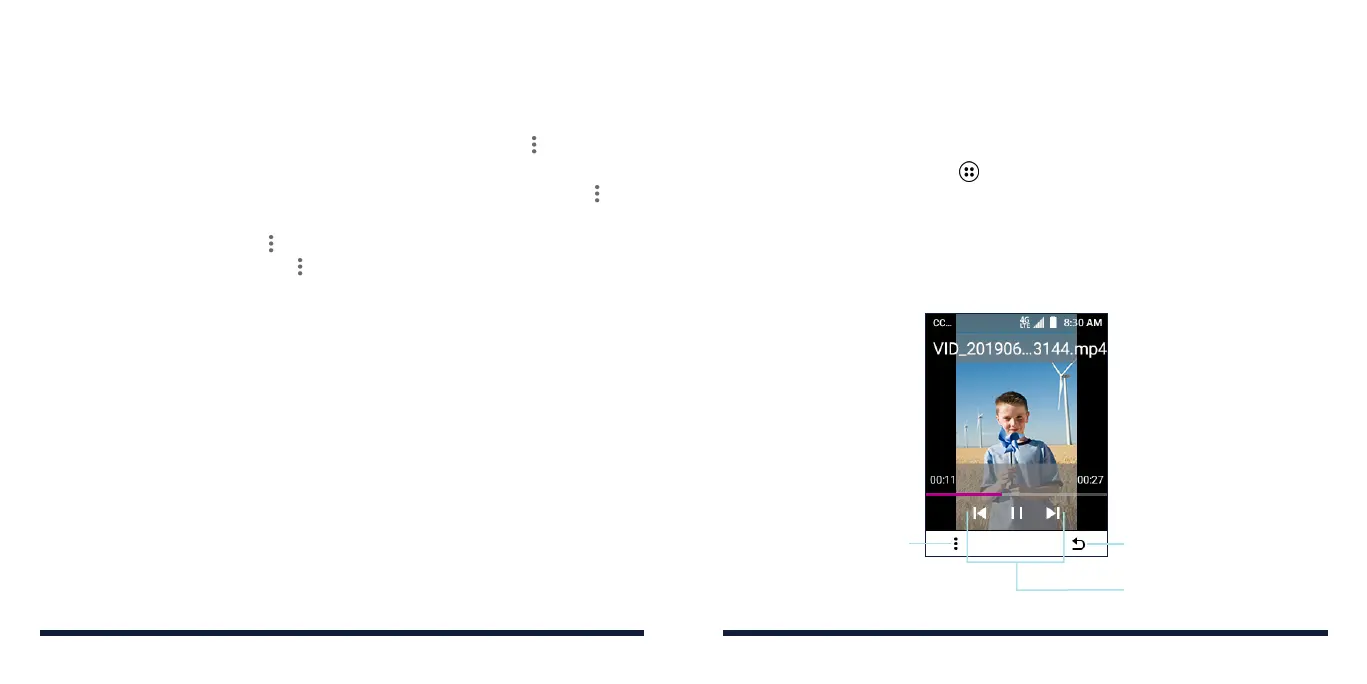
From the video playback screen, you can control playback or manage the video.
Press the Right Soft Key to
return to the video library
Playback control
(details below)
Press the Left Soft Key
to view options for the
current video: delete,
adjust brightness, share,
or view details
MUSIC



 To Next Page