IMPORTANT
The current day of the week should
already be set correctly. If not, see
Installer Setup to set the day.
Set
Temperature
Overrides
The thermostat has three temperature
override options: Override Until,
Permanent Override and Vacation Hold.
Override Until (TEMPORARY Override)
Holds temperature temporarily until the next
scheduled period time or until time is
selected.
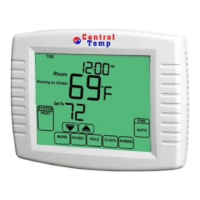
1. Press the Up or Down arrow below to the
temperature you want to adjust. Override
Until and set time appears on the screen.
2. Press Up or Down arrow next to the Time
to change the time to hold the adjusted
temperature setting.
3. If you want to exit Override Until, please
press the CANCEL key. Override Until will be
also exit until reach the set time.


 To Next Page