CT2001 Touchscreen Programmable Thermostat
Indoor Air
Quality
Reminders
Filter Change Reminder
The filter change reminder must be turned
on from the Installer Setup. Once expired,
the screen flashes RENEW FILTER. Press
the RESET key to reset the change
reminder.
NOTE: The days are counted as fan run
time, so anytime the fan is running, the
reminder is counting that time against the
number of days selected.
The remaining run time days can be viewed
by pressing the MORE key; the remaining
days can be edited by using the MORE key
or from the Installer Setup. To view or reset
the reminder by following steps before it
expires:
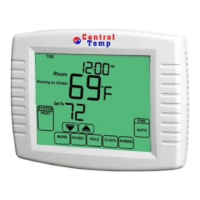
1. Press the MORE key until the filter
reminder appears on the screen. This is
the number of fan run-time days remaining
on the filter reminder.
Room
Set To
SYSTEM
MORE
SCHED HOLD CLOCK
SCREEN
AUTO
FAN
TUE
PM
HEAT
RESET
Override Until
RENEW FILTER
Room
Set To
SYSTEM
MORE
SCHED HOLD CLOCK
SCREEN
AUTO
FAN
TUE
PM
HEAT


 To Next Page