www.cool-icam.com
© 2001 TCG. UK Version 1 0301
Page 17
Important Notes:
All images will be lost when the memory is cleared. Please make sure you upload your wanted images before
clearing your Cool-iCam Plus’s memory.
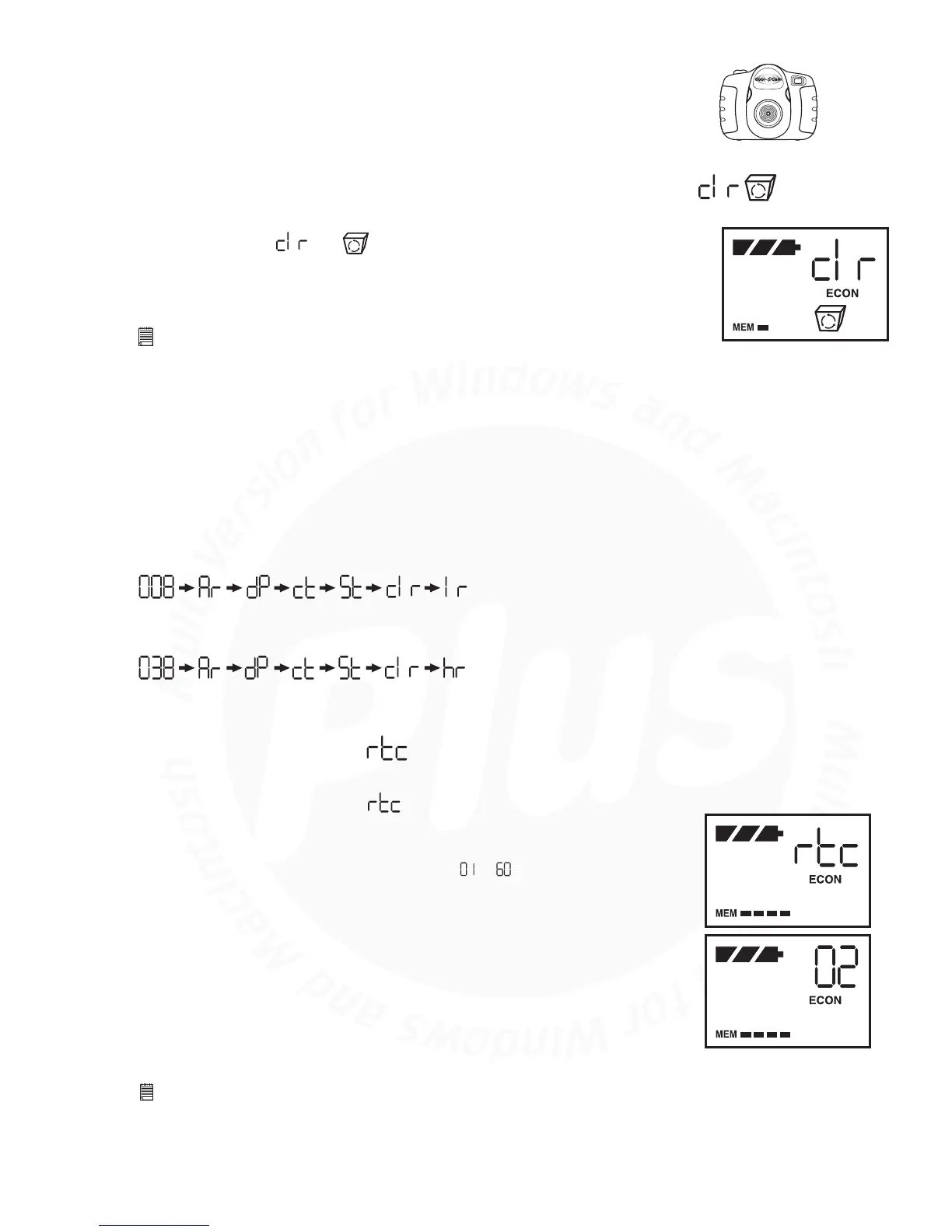
When you wish to clear the memory of your Cool-iCam Plus, press the
Mode Button until and appears on the LCD. Pressing the Shutter
Button once will cause the Cool-iCam Plus to beep. Pressing the Shutter
Button again within 5 seconds will clear all the images/movie clips/audio
clips stored and reset the image counter.
Image resolution can be changed whenever you need.
1. Cycle through the Mode options by pressing the Mode Button.
2. Press the Shutter Button once to change to the alternative resolution.
8.8 Clearing the Stored Images/Movie Clips/Audio Clips
8.9 Changing the Image Resolution
Press the Shutter Button to Confirm
(Available Images)
(Available Images)
Press the Shutter Button to Confirm
Changing from Normal Resolution Mode to Economy Resolution Mode:-
For Example:
Changing from Economy Resolution Mode to Normal Resolution Mode:-
To start time lapse:
Press the Mode Button until the appears on the LCD.
Press the Shutter Button once within 5 seconds to confirm Time Lapse Mode.
Immediately press the Mode Button to set the time interval between each
photo taken. The time range can be set from to minutes. For example, 1
press = 1 minute interval setting between images; 25 presses = 25 minute
interval. Press the Shutter Button to confirm and your Cool-iCam Plus will turn
to Stand-by Mode automatically, your Cool-iCam Plus is now timing the first
shot. If the Shutter Button is not pressed within 5 seconds the Cool-iCam
Plus will revert to the normal image taking mode.
The time lapse mode will be stopped when the memory of Cool-iCam Plus is
full.
When you have completed your Time Lapse session, you upload your images in
the same way as Continuous Mode. Please refer to Section 10.4.
Important Notes:
Time Lapse Mode cannot be performed when your Cool-iCam Plus is connected to your computer via USB cable.
The Time Lapse function will stop if you press the Mode Button during the Time Lapse Mode or connect to your computer
through USB cable.
We recommend you to install new batteries before starting time lapse.
8.10 Time Lapse Mode
1.
2.
3.
4.
•
•
•



 To Next Page