www.cool-icam.com
© 2001 TCG. UK Version 1 0301
Page 23
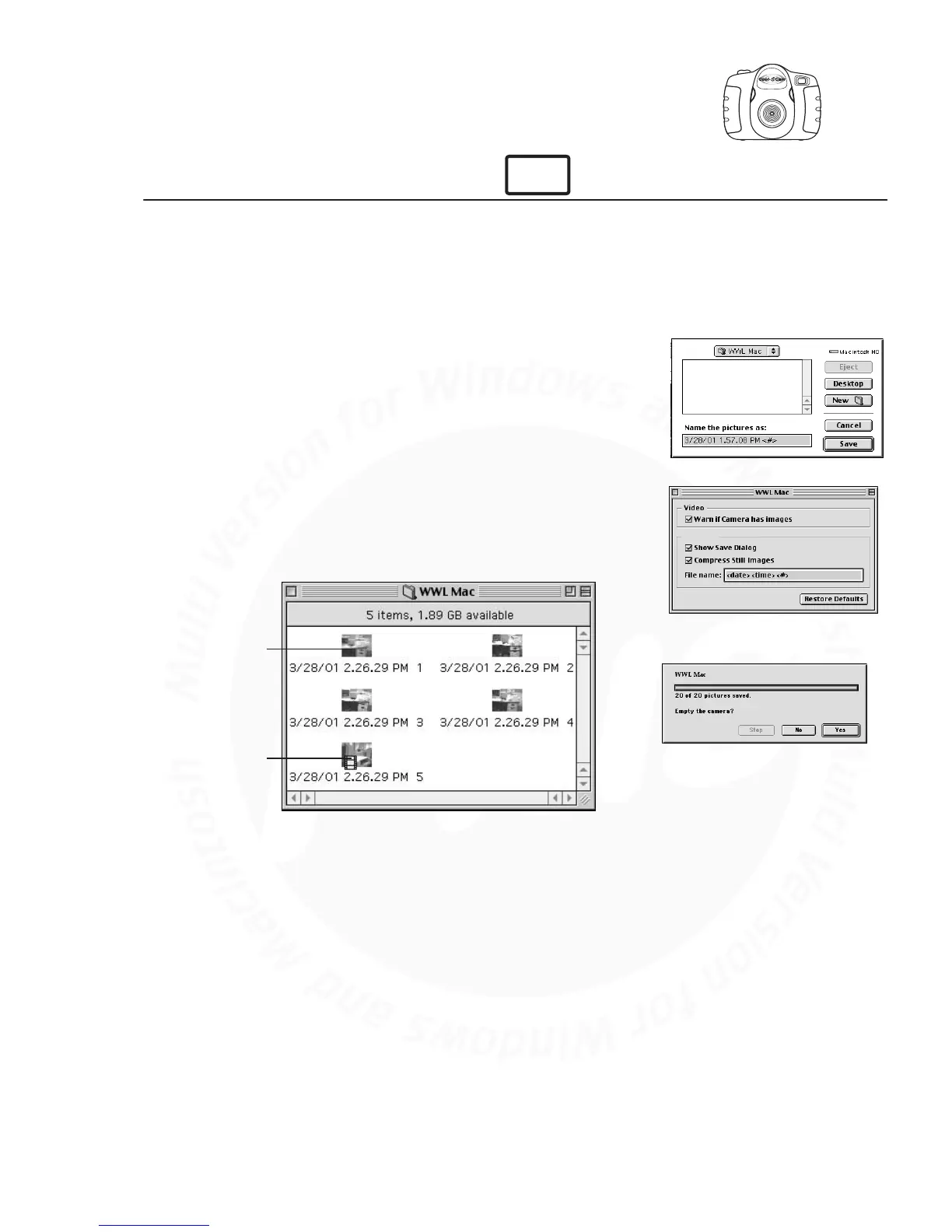
10.7 Uploading Images and Video Clips
Connect your Cool-iCam Plus to your Mac via USB cable.
A window will pop up and ask you to name the pictures (images). File
name format is default as <Date> <Time> <No. of image>. You can
change the name by going to double clicking the "STV0680 Camera" or
"WWL Mac" icon in the Control Panel.
Click "Save"
Your Mac will ask you if you want to empty your Cool-iCam Plus.
• If you click "Yes", images stored in your Cool-iCam Plus will be deleted.
• If you click "No", images stored in your Cool-iCam Plus will be retained.
Individual images and video clips will be uploaded to your "STV0680
Camera Snapshots" or "WWL Mac Snapshots" folder.
1.
2.
3.
4.
5.
For Macintosh™ User:
Uploaded images
Uploaded movie clip
MAC



 To Next Page