Setting the Time and Date
The Timeclock manager option contains numerous features
related to the time and date, including daylight saving
time, global coordinates and the selection of changes to
channel outputs at set times. For further information about
the other Timeclock manager features, please refer to the
accompanying System Manual.
To Set the Time and Date
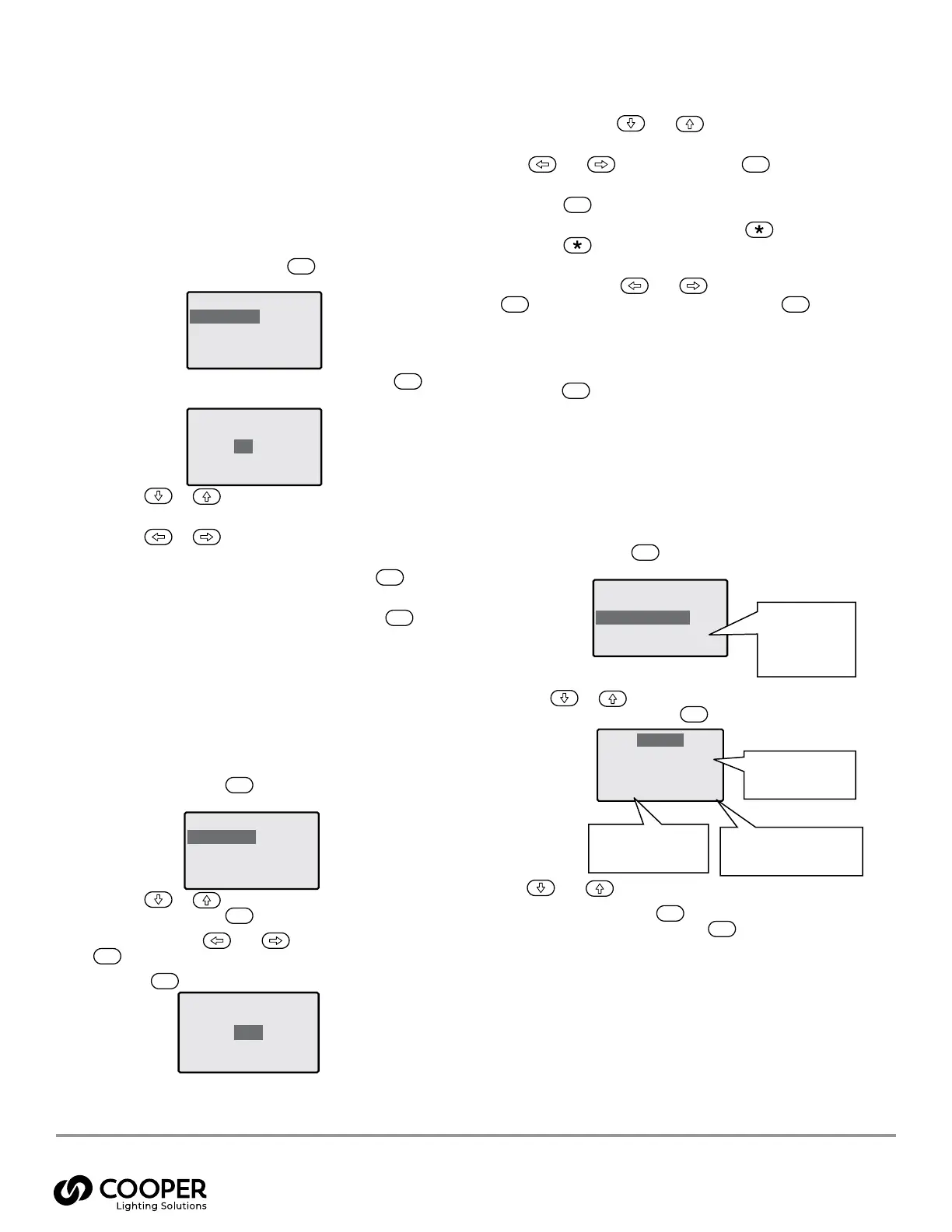
1. From the Operation menu, highlight the ‘Timeclock
Manager’ option and press the
ENT
button. The
display will show the available options:
TimeclockManager
Time &Date
Events
Coordinates
Daylight Saving
2. Highlight the ‘Time & Date’ option and press the
ENT
button. The display will show the current time and date:
TimeclockManager
Time &Date
23:0123
21 Aug 2008
3. Use the
or
buttons to move the highlight
between the items: hour, minute, day, month or year.
Use the
or
buttons to change the highlighted
item, as required.
4. When all items have been updated, press the
ENT
button to save and exit.
To exit without saving your changes, press the
ESC
button.
Overriding Outputs
On occasions it may be necessary to override the levels
of one or more outputs. This option provides the ability to
affect outputs individually or all of them collectively. You
may also select any of the first 128 standard Scenes or even
the Emergency Scene (Scene 132).
To Override Outputs
1. From the Operation menu, highlight the ‘Output Override’
option and press the
ENT
button. The display will show
the available options:
Override-Options
All Outputs
Each Output
Select Scene
2. Use the
or
buttons to highlight the required
option and press the
ENT
button to select:
All Outputs - Use
and
,
or the keypad (and
ENT
) to select the dimming level (0 to 100%).
Press the
ESC
button to exit
Override: AllOutputs
Enter Level
50%
Each Output - Use
and
to highlight the
required Output.
Use
and
,
or the keypad (and
ENT
) to select
the dimming level (0 to 100%).
Press the
ESC
button to exit.
To Flash the selected Output press the
button.
Press the
button a second time to stop the
channel from flashing.
Select Scene - Use
and
,
or the keypad (and
ENT
) to select the required Scene. Press the
ESC
button to exit.
ote: N If there are no settings within a selected Scene, the
display will show ‘Scene Empty’.
3. Press the
ESC
button to return to the Operation menu.
Viewing Power Data Readings
The Power Data section provides useful feedback and
confirmation of the total power demanded within the Source
Controller, listed as a total for the whole unit, as totals by
phase or values for individual Outputs.
To View Power Data from the Menu
1. From the Operation menu, highlight the ‘Power Data’
option and press the
ENT
button. The display will show
the available options:
PowerData
TotalPower xxxkW
DisplaybyPhase
DisplaybyOutput
2. Use the
or
buttons to highlight the ‘Display by
Output’ option and press the
ENT
button to select:
Output 1
Voltage 120 V60Hz
Current 7.2 A
Power 0.8 kW
Pwr: 100% HF: 100%
3. Use
and
to view the required output number.
4. When finished, press the
ESC
button to exit to the
previous level and then press the
ESC
button to return
to the Operation menu.
ote: N On SC-UN-FT controllers only, please refer to the Total
Power information and display by output
information only. Display by phase may not be
accurate as feeding breakers are not housed within
the controller.
Total power currently
being supplied by the
whole Source Controller
Voltage, Current and Power
values for the chosen
Output
Dimming level of the low
voltage HF control side of
the Output
Dimming level of the
high voltage side of the
Output
Warranties and Limitation of Liability
Please refer to www.cooperlighting.com for our terms and conditions.
9850-000234-02 page 16
May 2024
Cooper Lighting Solutions
1121 Highway 74 South
Peachtree City, GA 30269
P: 770-486-4800
www.cooperlighting.com
For service or technical assistance:
1-800-553-3879
Canada Sales
5925 McLaughlin Road
Mississauga, Ontario L5R 1B8
P: 905-501-3000
F: 905-501-3172
© 2024 Cooper Lighting Solutions
All Rights Reserved.
Product availability, specifications,
and compliances are subject to
change without notice.
Universal Source Controller WaveLinx Wired
9850-000234-02



 To Previous Page