25
1.
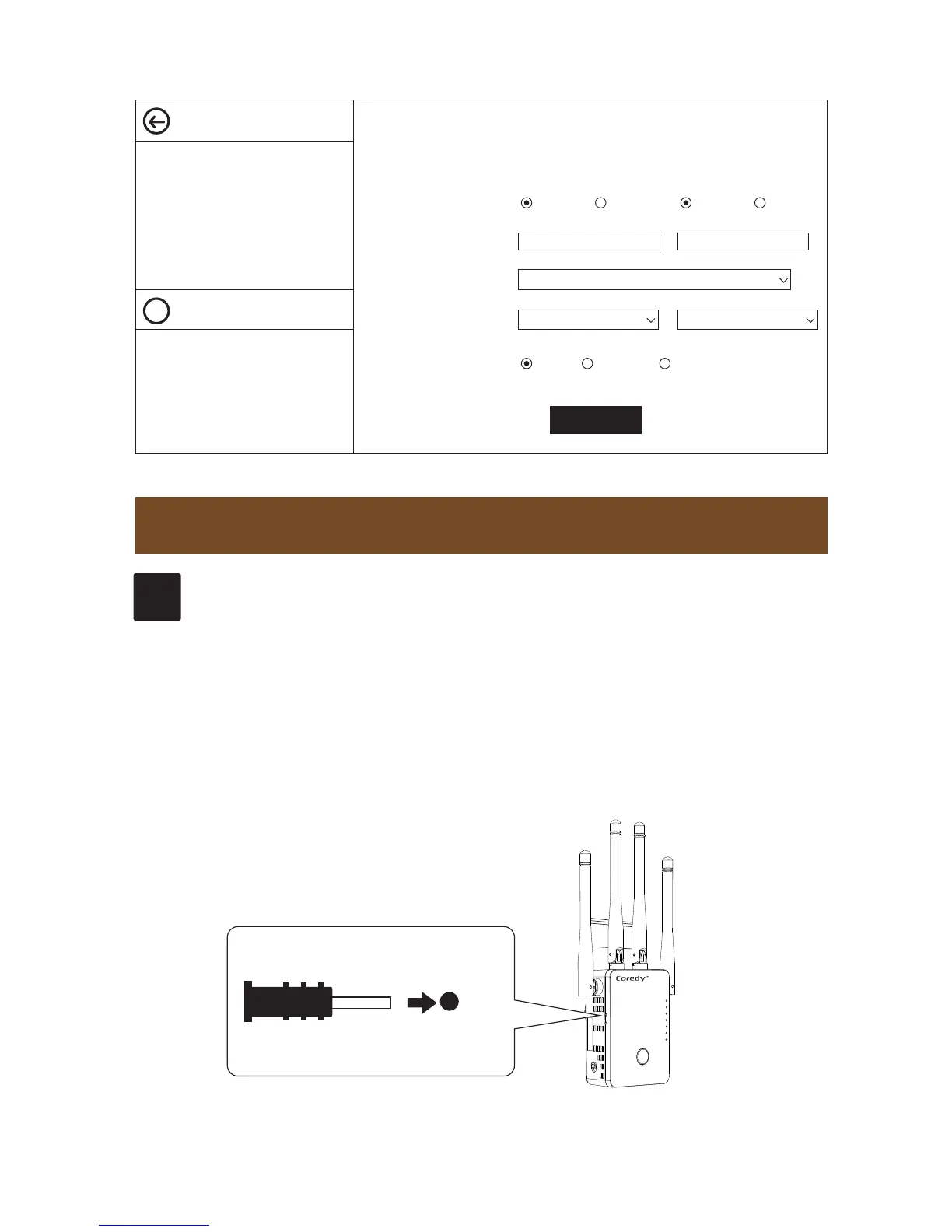
Power on the CX-E120, hold the Reset button by
using a Reset Pin for approximately 3 seconds.
2.
Release the reset button then all lights on.
When some of lights slow down flashing, the device
has been reset successfully.
TROUBLESHOOTING
WiFi
WPS
WAN/LAN
LAN
POWER
Reset
Wireless Settings
Basic Settings
Help
?
Basic Settings
Wi-Fi 2.4G Wi-Fi 5G/AC
2.4G Advanced Settings
5G Advanced Settings
WPS Settings
Broadcast SSID
SSID
Security Type
Wi-Fi Channel
Wi-Fi Power
Coredy CX-E120_2.4G
OPEN
Enable
SSID: Less than 32-bit characters
Channel:Wireless data transmission
channel. If you select Automatic, AP
will automatically select the best
channel!
High Medium Low
Disable Enable Disable
Coredy CX-E120_5G
6 36
Apply
Q1
How to reset CX-E120 to factory settings?


 To Next Page