11
3.2 Map Navigation and Management
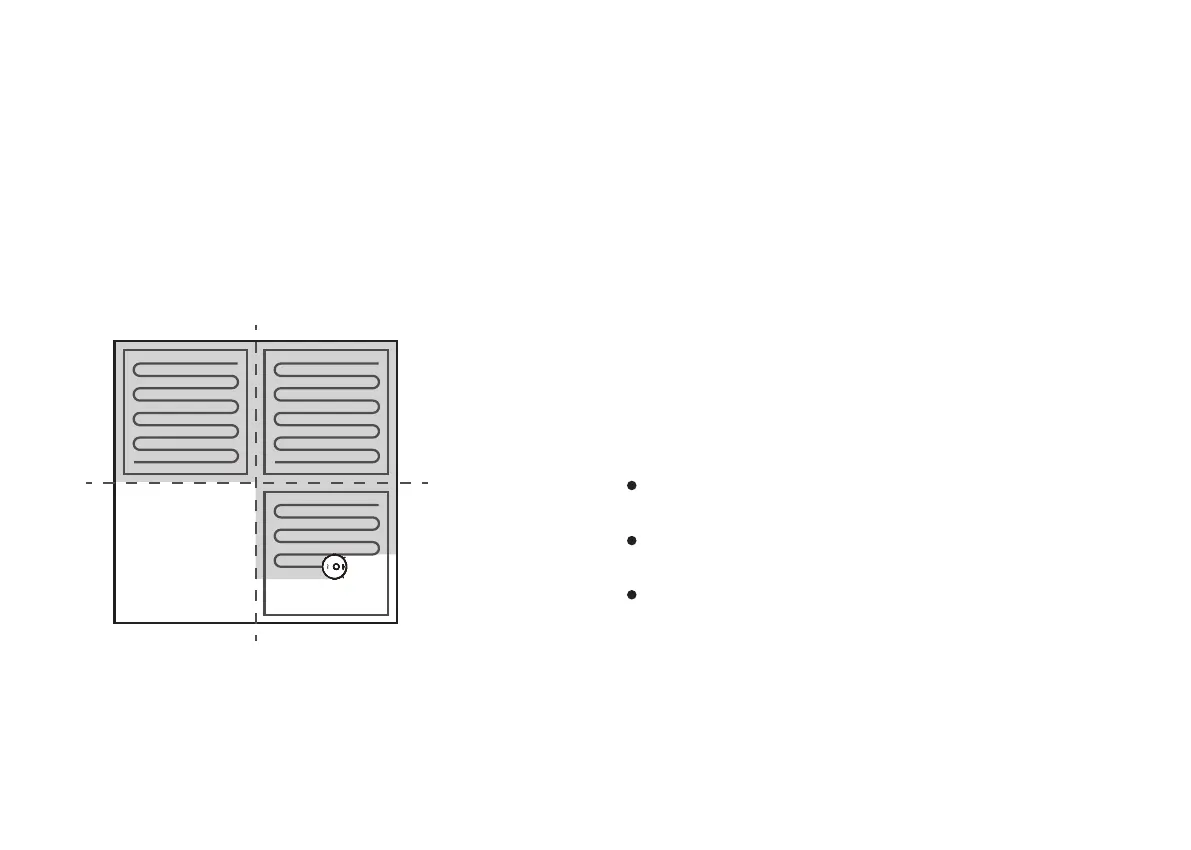
Once plan cleaning gets started, Coredy Robot FL022 will
move from the Charging Dock, automatically scan to
generate maps, intelligently plan its cleaning route, and
divide the space into zones.
The cleaning paths are planned along the walls, following
a bow-shaped cleaning method to complete the cleaning
of each zone one by one.
Navigation
Real-time mapping can help you learn about the cleaning
path and environment easily. A floor plan will be built up
after cleaning. The map will be updated instantly during
each cleaning to ensure normal navigation.
Real-time Mapping & Floor Plan
1. Open your doors for Coredy Robot FL022 to map each
room;
2. Remove any objects that may be in the way.
Note:
Do not remove the Charging Dock after a floor plan is
created.
Note:
Make sure Coredy Robot FL022 starts each cleaning from
the Charging Dock.
During cleaning, do not move the device frequently. If
moved, place Coredy Robot FL022 back to the original
position.
To create a complete floor plan:
If the position of Coredy Robot FL022 / Charging Dock is
adjusted or the surroundings are changed significantly,
Coredy Robot FL022 will try to relocate and may remap to
match the surroundings.
Coredy Robot FL022 will resume cleaning if the
relocalization is successful.
Relocation & Remapping
If the relocalization fails, Coredy Robot FL022 will remap
to ensure normal navigation with a new cleaning.
If it is in a No-go zones, Coredy Robot FL022 will not
start cleaning.


 To Next Page