34
4.9 Battery and Charging
Information
Lithium Ion Battery
Important: Lithium ion batteries and products that contain
lithium ion batteries are subject to stringent transportation
regulations.
If you need to ship this product (with the battery included) for
service, travel or any other reason, you MUST comply with the
following shipping instructions:
Battery Charging
To extend battery life, always keep robot charged on the
Home Base when not in use.
Battery Storage
If storing robot off of the Charging Dock, remove the battery
first. Then store robot and the battery in a cool, dry place.
Battery Disposal
Contact your local waste management authority for battery
recycling and disposal regulations in your area.
Battery Replacement
You can visit Coredy’s website http://shop.coredy.com to
purchase the battery or other accessories for the robot.
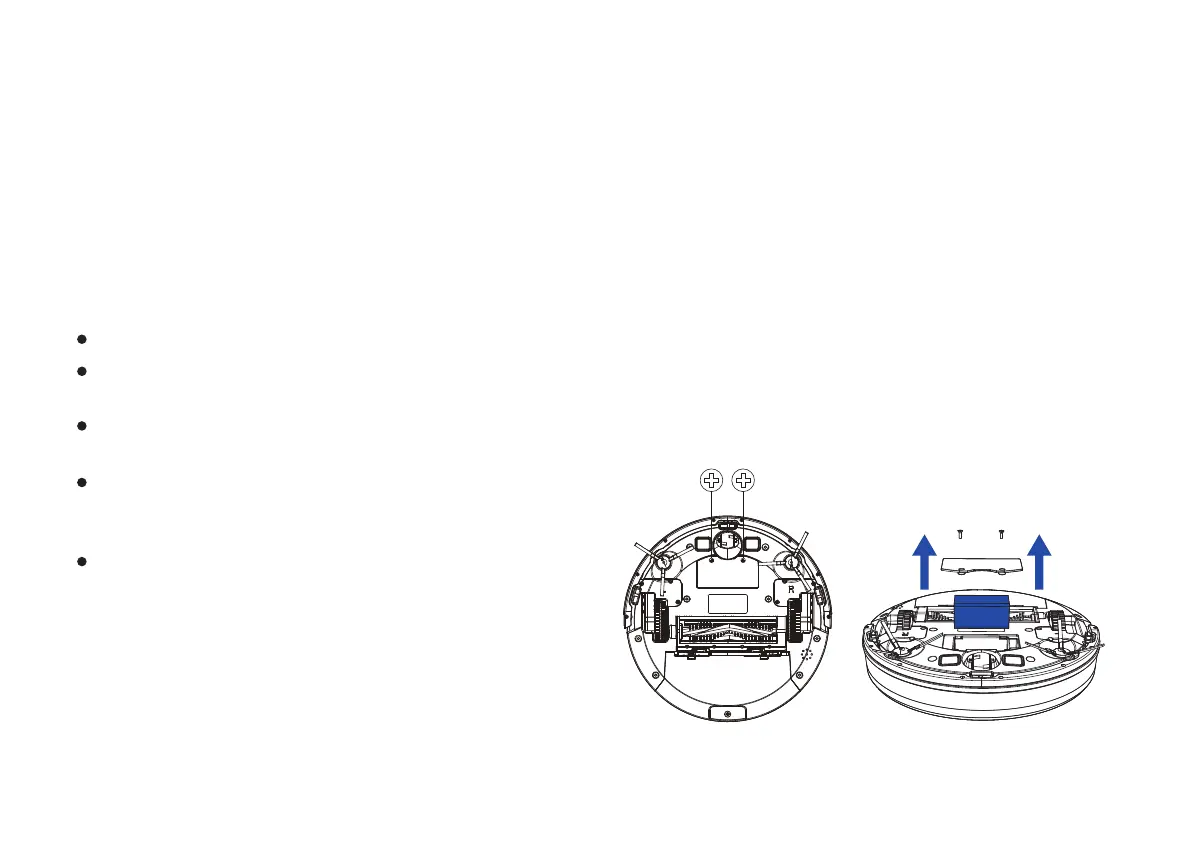
Battery Removal
Follow these instructions to remove and reinstall robot’s
battery:
1. Unscrew the two screws on the battery cover, then remove
the cover.
Remove the lithium ion battery from the product
Place a piece of tape over the battery’s metal charging
contacts
Reinstall the battery (with the tape on it) in the product
and secure the battery door
Package the product in its original packaging or in your
own packaging that prevents any movement during
transportation
Ship via ground transportation only (no air shipping)


 To Next Page