Viper Installation Manual
© 2008-2015, Cornelius Inc. - 27 - Publication Number: 621260373INS
Pressurizing the Water System
Perform the procedure in Table 14 to verify the water connection to the unit.
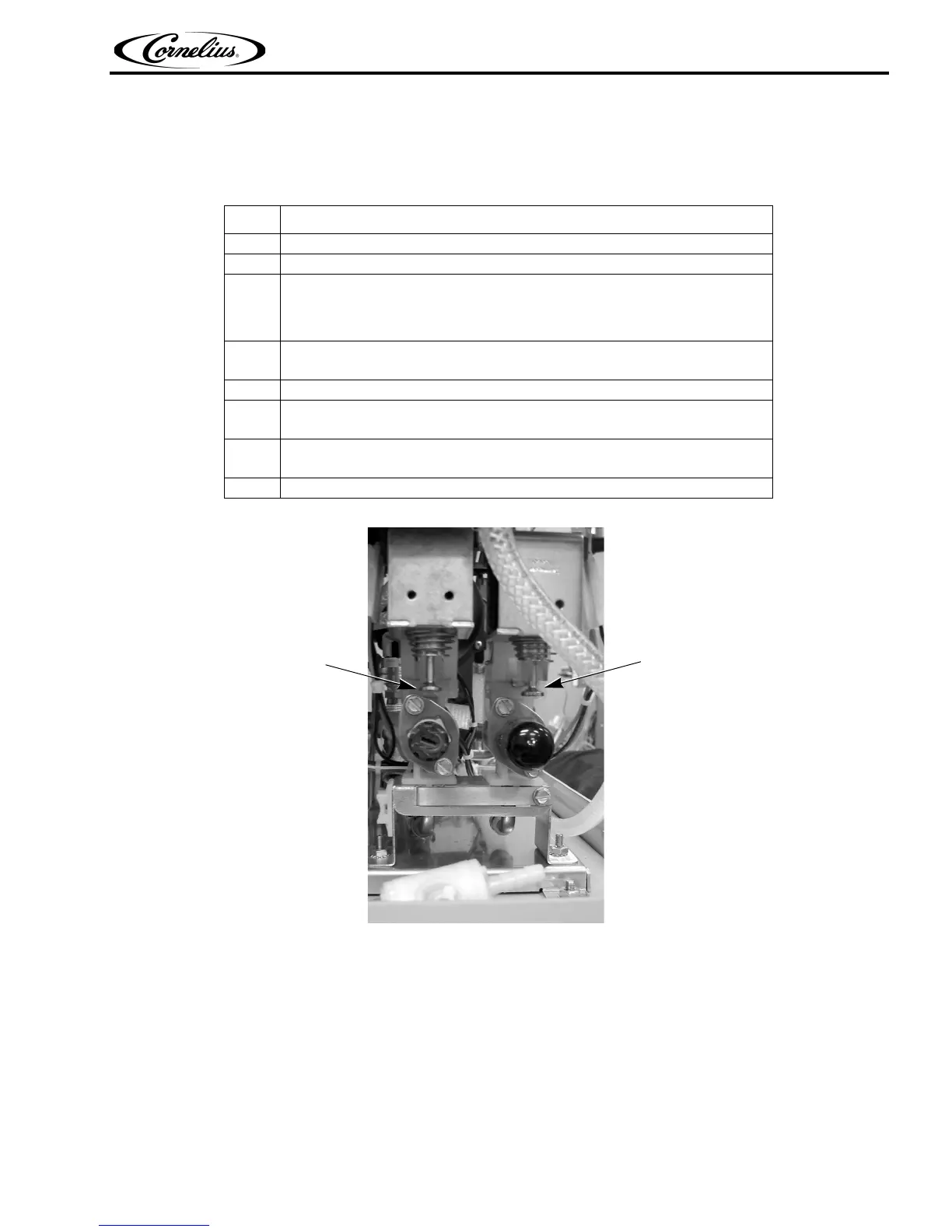
Manual
Water
Valve
Manual
Syrup
Valve
(push up to open)
(push up to open)
Figure 26.
NOTE: Remove the valve cover to access syrup and water valves.
Pressurizing the Syrup System
Perform the procedure in Table 15 to pressurize the syrup system.
Table 14.
Step Action
1 Turn on the water supply to the unit.
2 Check the system for leaks.
3
The Do Not Drink and Out of Product lights remain on.
NOTE: The H2O Out error does not clear until CO2 pressure is
applied.
4
Turn the product supply valve to the down (BRIX) position and open the
valve at the end of the sample tube.
5 Place the end of the tube in a bucket.
6
Manually lift the water valve at the front of the unit (Figure 26) to fill the water
system.
7
When water flows from the sample tube, the system is full and you may pro-
ceed to Table 12 and pressurize the CO
2 system.
8 Repeat Steps 4 through 7 for each barrel in the unit.












 To Next Page