Standard Recommended Procedure 003-794-AEN | Issue 14 | March 2020 | Page 25 of 27
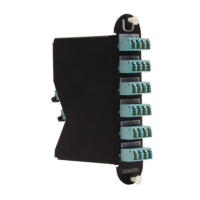
6.2 Replace EDGE™ Module
Step 1: Open front door and pull tray out.
Step 2: Press latch on LC connector and pull connector out (Figure 32). If jumper is equipped with MTP
connector, simply grasp connector body and pull connector out of the adapter. (NOTE: only LC
connectors shown in Figure 30.)
Press lever on right side of module and pull module out.
Step 3: Unplug MTP connector(s) in rear of module.
Step 4: Reverse process to install new module (or panel, if upgrading the network).
Figure 32 — Replace EDGE Module


 To Next Page