40 - ORDINARY MAINTENANCE
COROB™ D600 - D700 - D800 EXTRA
WITHOUT HUMIDIFIER SYSTEM WITH SOLVENT HUMIDIFIER
SYSTEM
WITH WATER HUMIDIFIER
SYSTEM
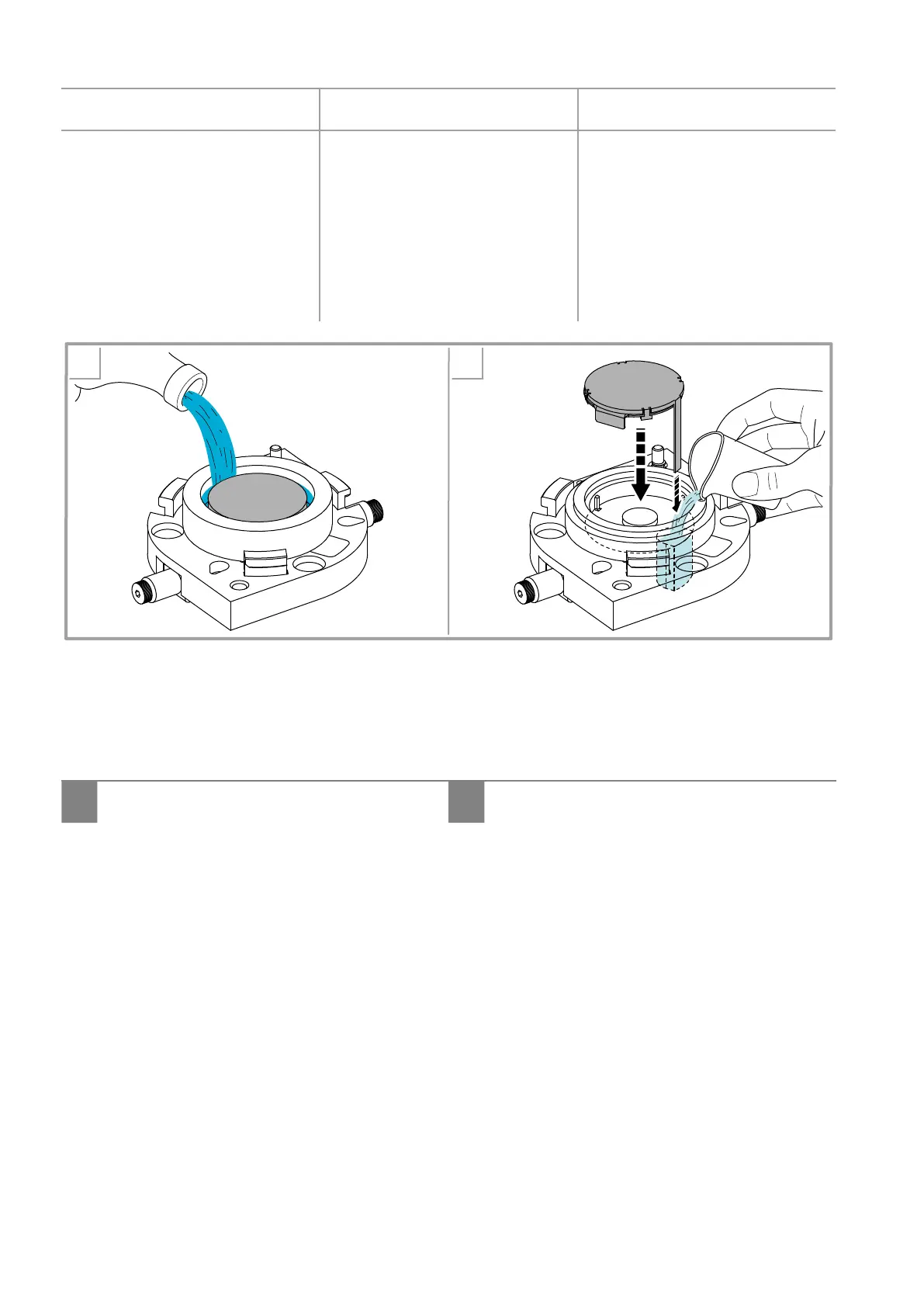
a. Check the condition of the
sponge and moisten as needed.
The level of the humidifying
liquid must not exceed the
height of the sponge. If it is
very dirty, remove the sponge
from the cap and wash it
thoroughly.
b. Check the condition of the
sponge. If it is very dirty,
remove the sponge from the
cap and wash it thoroughly.
Top up with a small quantity
of solvent the tank inside
the sponge support; when
repositioning the sponge on
the lter, be careful to dip the
tail into the solvent.
c. Check the condition of the
sponge. If it is very dirty,
remove the sponge from the
cap and wash it thoroughly.
a b
Figure 25
5. In all cases, if the sponge is severely damaged, replace it.
6. Fit back the sponge support.
7. Connect power supply and switch on the machine (chapter 5.3).
8. Close the Autocap...
I it closes automatically during initialization. II
bringing the machine to the on-line condition, by
means of the off-line button.



 To Next Page