57
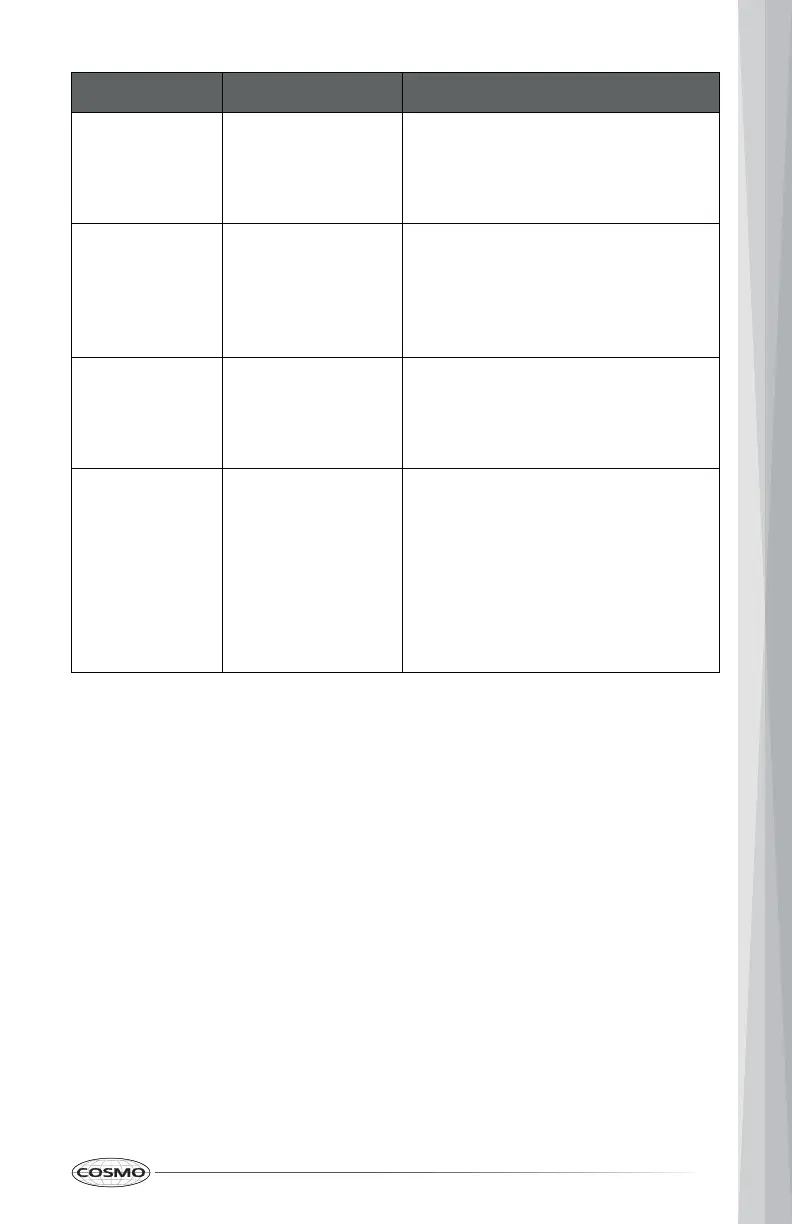
PROBLEM POSSIBLE CAUSE SOLUTION
Clock and
timer are not
working
properly
No power to the
range.
Check the circuit breaker or fuse
box to your house. Make sure
there is proper electrical power to
the oven.
Excessive
Moisture on
door glass
Condensation
from cooking
foods with high
moisture content.
This is normal. Condensation will
evaporate as oven heats up.
Convection Bake and Convection
Roast will eliminate any moisture
in the oven.
Porcelain
Chips
Porcelain interior
is chipped by
oven racks
When removing and replacing
oven racks, always tilt racks
upward and do not force them to
avoid chipping the porcelain.
"E" and a
number
appears in
display
System error
detected.
This is an error code. Press
CANCEL/OFF to clear the display
and stop the beeping. If
necessary, reset oven power at
the circuit breaker. If error code
remains or repeats, write down
error code and contact a qualified
service provider for repairs.


 To Next Page