EasyManua.ls Logo

Cotek SP-3000 - Command Format

Default Icon
46 pages
Print Icon
To Next Page IconTo Next Page
To Previous Page IconTo Previous Page
Loading...
38
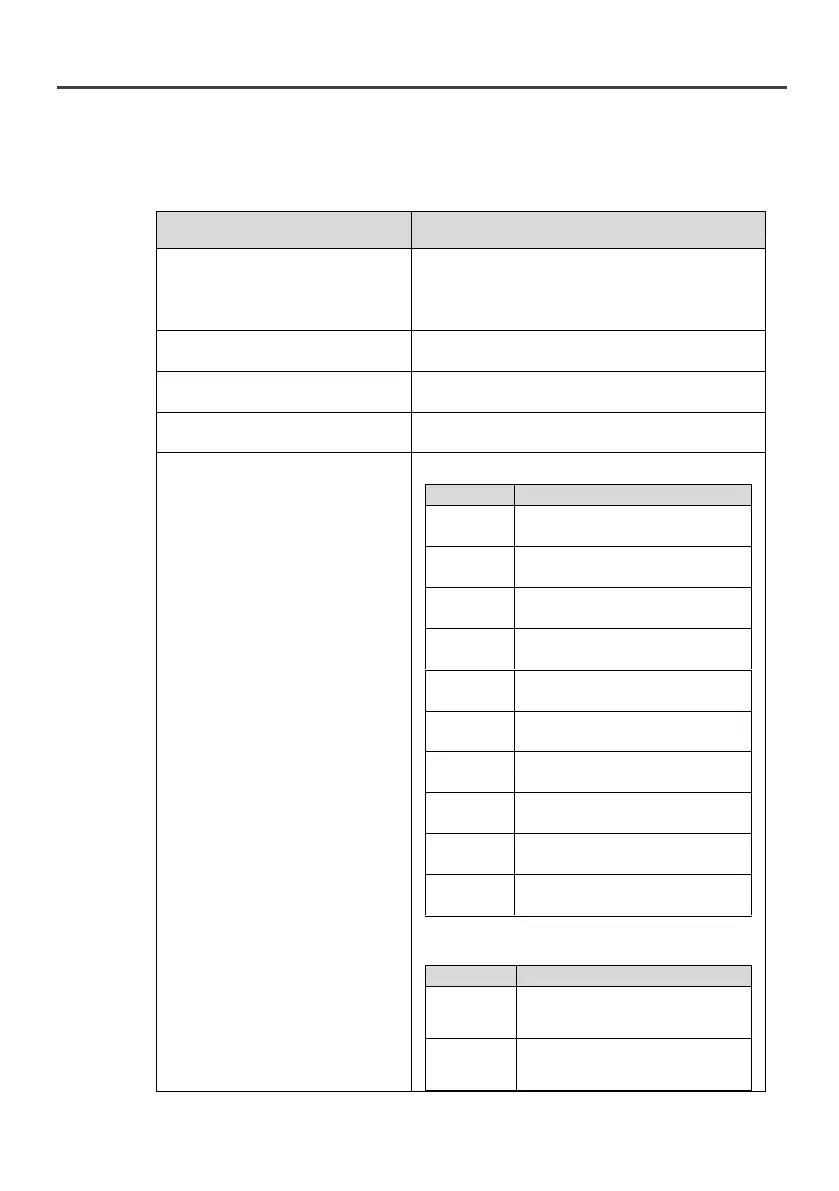
5-3-2. Command format
The following table shows the useful command to operate SP
series.
Function
Command and description
Turn ON / OFF SP series
Format : Power <value>
<value> can be one of the following.
“0” : Power OFF
“1” : Power ON
Query the SP series output
frequency
Format: FRQ?
Query the SP series output
voltage
Format: VINV?
Query the SP series output
current
Format: IINV?
Query the SP series status
Format: ERR? (SP-700~2000)
Bit
Description
BIT0
0: No OLPL Protection
1: OLPL Protection
BIT1
0:No Sof Fail Protection
1:SofFail Protection
BIT2
0:No Poff Protection
1:Poff Protection
BIT3
0:No UVP Protection
1:UVP Protection
BIT4
0:NoOVP Protection
1:OVP Protection
BIT5
0:No OLPM Protection
1: OLPM Protection
BIT6
0:No OLPH Protection
1: OLPH Protection
BIT7
0:No OTP Protection
1: OTP Protection
BIT8
0:No UTP Protection
1: UTP Protection
BIT9
0:No OOCP Protection
1: OOCP Protection
Format: ERR? (SP-3000~4000)
Bit
Description
BIT0
0: No ID Fail
1: ID Fail
BIT1
0:No Sof Fail Protection
1:SofFail Protection

Other manuals for Cotek SP-3000

Related product manuals