Kangaroo™ Connect Enteral Feeding Pump | 12
Table of Contents
Section 5 — System Setup
Installing a WiFi/Ethernet Module
The WiFi/Ethernet module shall be packaged with its own AC power adapter,
CAT5 cable and Gateway quick start guide. Follow the directions provided in the
quick start guide to connect and configure the WiFi module for use.
Note: The Kangaroo Connect WCH is not intended to be ambulatory.
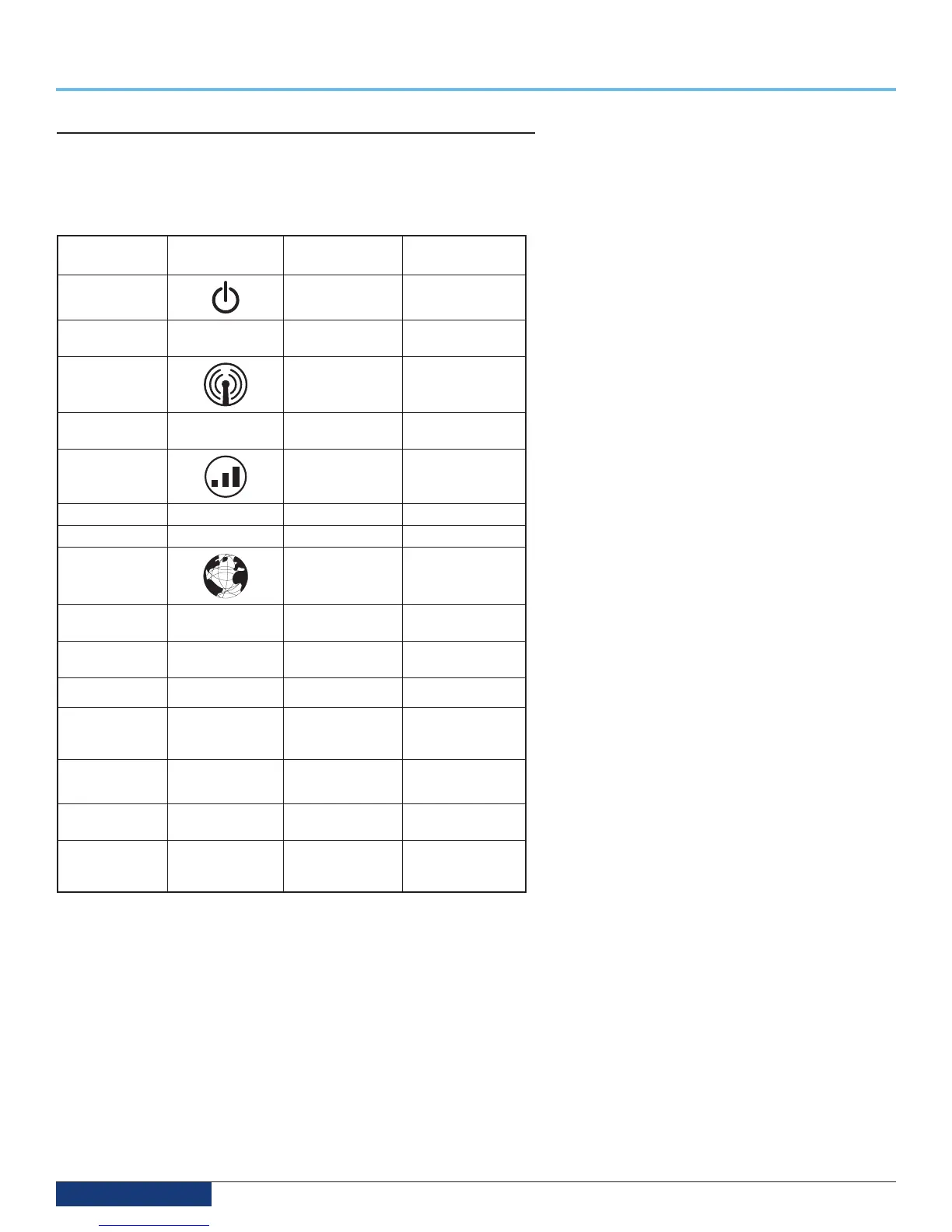
Indicator Light Light
Symbol
Indicator
Light Status
WCH
State
Power Light Off WCH does not
have power
Solid Green WCH is
receiving power
ZigBee™* Light
Off Radio Disabled
Blinking Green
(Slow)
Ready to connect
to pump
Cellular Signal
Strength
Off No Signal
Solid Yellow Adequate signal
Solid Green Good signal
Network Light
Off Powered Off
Blinking Yellow
(slow)
Powered ON, no
network link
Blinking Yellow
(fast)
Network link,
no IP address
Solid Yellow IP address assigned
Blinking Green
(slow)
Attempting a
connection to
the server
Blinking Green (fast) Server found,
authenticating
Solid Green Connected to
the server
Alternating
between Green
and Yellow
Cannot connect
to server
If assistance is needed in setting up, using, or maintaining the wireless
communications hub (WCH or WiFi module), please contact Customer Service for
additional support.


 To Next Page