Kangaroo™ Connect Enteral Feeding Pump | 11
Table of Contents
Section 5 — System SetupSection 5 — System Setup
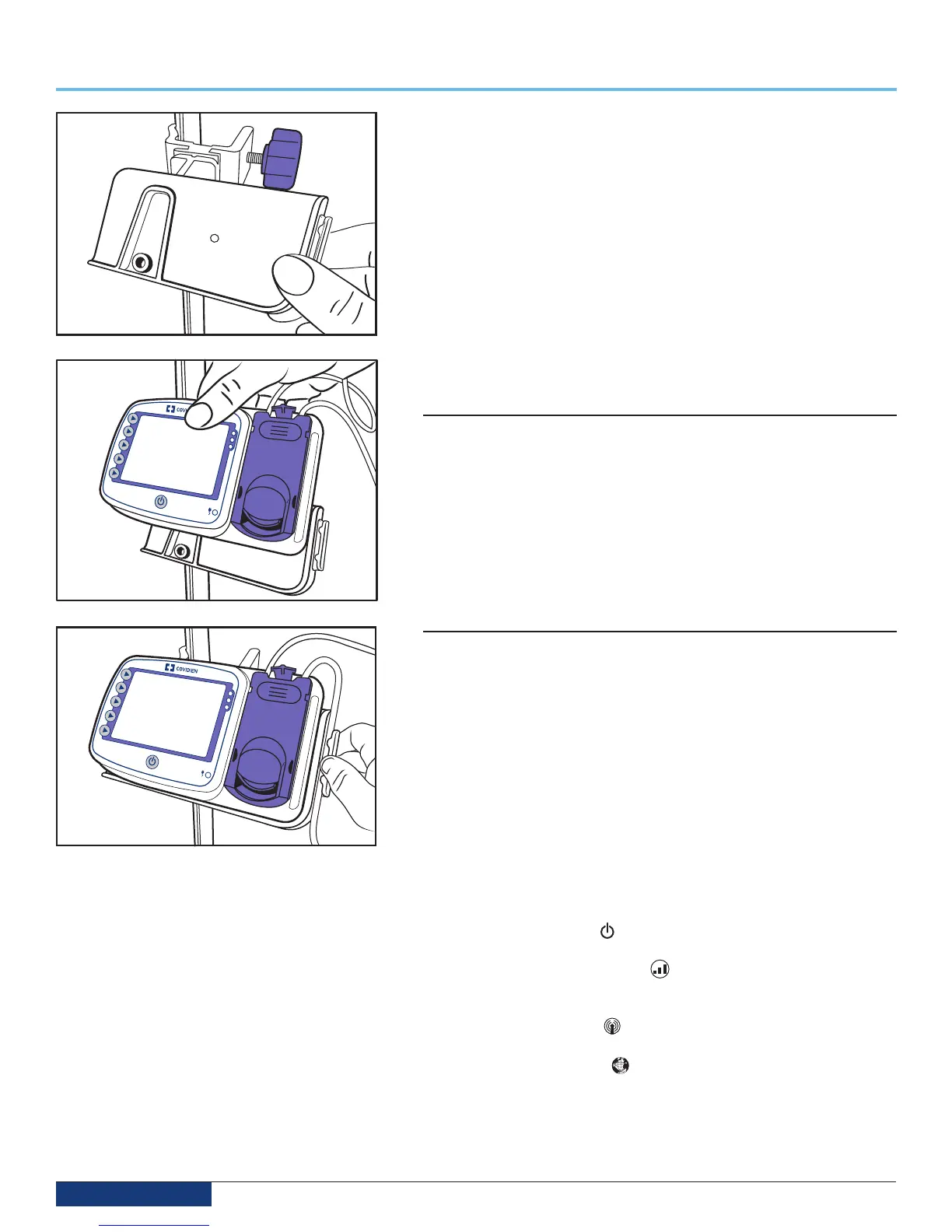
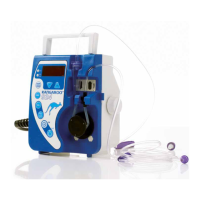
Hold the pump and place the back face of the pump against the flat portion of
the pole clamp latch plate. Slide the pump to the right until the pump hits the
latch plate guide. Keeping contact with the guide, slide the pump downward
until you hear a positive “click”. This indicates that the pump has been properly
seated. To remove the pump, gently pull upward on the pump until it “pops”
upward off the latch plate (Fig 5).
Follow the same procedure as above for attachment of the WCH to the pole
clamp. The pole clamp is designed to work universally with either the pump or
the WCH (Fig. 5 and Fig. 6).
Note: The plastic retention plate is designed to be rotated in 90 degree
increments to allow attachment to a horizontal tabletop surface or a horizontal
bed rail. This rotation is done by grasping the latch plate and twisting until the
latch plate “pops” into the next angled position.
If assistance is needed in setting up, using, or maintaining the pump, please
contact Customer Service for additional support.
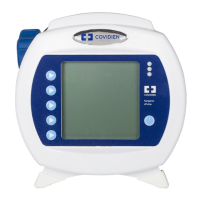
Using the Pole Clamp tube support guide
The Pole Clamp tube guide is designed as an additional support for the tubing.
To install the tube into the tube guide, complete the following steps:
1. Ensure the Cassette is properly loaded.
2. Select the tube that goes to the patient (tube exiting the right side of
the cassette).
3. Press the tubing into the tube guide creating a loop above the pump
(see fig. 6).
4. Ensure that the loop has sufficient length to make a gradual curve.
Installing a Wireless Communications Hub (WCH)
The WCH is designed to work with the Kangaroo Connect pole clamp and
Kangaroo Connect power adapter that are packaged with the pump. The WCH
may also be powered using the Kangaroo Connect car charger. If it is desired
to have the WCH powered or attached independent from the pump, contact
Customer Support to order additional accessories.
Note: The Kangaroo Connect WCH is not intended to be ambulatory.
To Install the WCH, complete the following steps:
1. Remove packaging materials from the WCH.
2. Place the WCH on a tabletop surface or affix to the pole clamp.
3. Plug power adapter into wall outlet.
4. Plug the keyed end of the power adapter into the back of the WCH.
5. Look through the transparent window on the back of the WCH to confirm
its operating status. Reference the table in this section for icon descriptions
and pictures.
a. The power indicator should be lit up to indicate that power is being
supplied to the WCH.
b. The signal strength indicator should be yellow or green to indicate
presence of a cellular signal. If the signal strength indicator is not lit,
reposition the WCH to a location with a better cellular signal.
c. The Zigbee indicator should be flashing green. If the Zigbee
indicator is not green, relocate the pump closer to the WCH.
d. The network indicator should be solid green. This light indicates
when the WCH has a good network connection. If this light is not
green, reposition the WCH until a green light is achieved.
Fig. 6
Fig. 5
Fig. 4


 To Next Page